






With MLB the show 26 early access, players are already discovering several new gameplay settings and mechanics that subtly change how the game is played. While the update may not introduce massive headline features, it does bring a variety of quality-of-life improvements that can significantly affect both casual and competitive gameplay.
From adjustable PCI sensitivity to entirely new systems like Bear Down Pitching, these additions provide players with more control over how they approach hitting and pitching. Understanding how these systems work—and when to use them—can give you a meaningful edge, especially in competitive modes.
This guide will break down the most important new features in MLB The Show 26, explain how they work, and help you decide whether they belong in your gameplay setup.
Understanding PCI Sensitivity
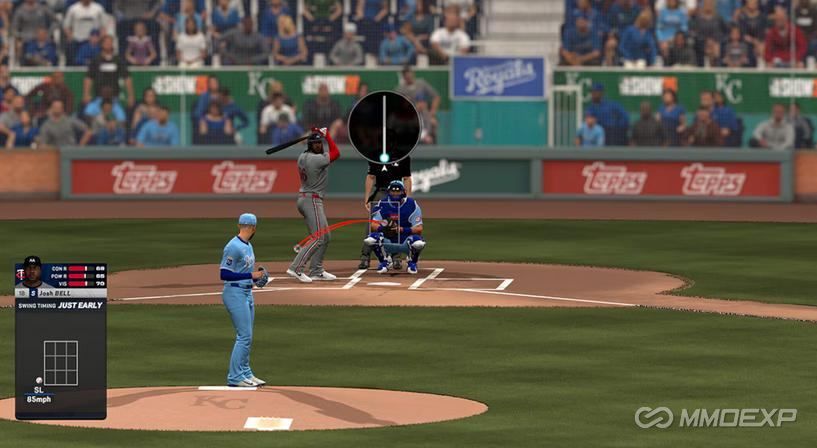
One of the most talked-about additions in MLB The Show 26 is the PCI Sensitivity slider. For the first time, players can adjust how quickly the Plate Coverage Indicator (PCI) responds to controller input.
In previous versions of the series, including MLB The Show 25, the PCI movement speed was fixed. Players had to adapt their muscle memory to the default sensitivity, which sometimes made hitting difficult depending on controller setup or personal preference.
Now, players can tune this sensitivity to their liking.
How PCI Sensitivity Works
The slider essentially controls how quickly your PCI moves across the strike zone when you move your analog stick.
Higher sensitivity: The PCI moves faster across the zone.
Lower sensitivity: The PCI moves more slowly and deliberately.
At first glance, this sounds like a simple quality-of-life setting—but in practice, it can dramatically affect timing and accuracy.
The Downsides of Lower Sensitivity
While lowering PCI sensitivity might sound appealing for precision, it can introduce an unexpected feeling of delay.
When sensitivity is reduced significantly, the PCI moves so slowly that reacting to fast pitches becomes difficult. Players might feel like their input is lagging behind the pitch, even though the system is technically working as intended.
This can lead to:
Late adjustments to fastballs
Difficulty reacting to inside pitches
A general loss of responsiveness
Because of this, extremely low sensitivity settings may not be ideal for competitive play.
When to Adjust PCI Sensitivity
A slight adjustment can be beneficial in certain scenarios.
For example:
Lower difficulties: PCI movement tends to feel slower, so slightly increasing sensitivity may help with responsiveness.
Players without precision stick accessories: Lowering sensitivity slightly may help with control.
High-level players: Some may prefer slightly higher sensitivity to react quickly to high-speed pitches.
A good starting point is to keep sensitivity near default and adjust it one or two notches at a time until it feels comfortable.
Big Zone Hitting: A Hybrid System
Another new hitting option introduced in MLB The Show 26 is Big Zone Hitting.
This mechanic blends elements from several hitting systems:
Zone hitting
Directional hitting
Guest pitch mechanics
The goal is to create a more forgiving system for players who struggle with precise PCI placement.
How Big Zone Hitting Works
Instead of requiring perfect PCI placement, Big Zone Hitting provides a larger targeting area that players can adjust during the pitch.
This allows players to:
Start with a general hitting zone
Adjust slightly during the pitch
Focus more on timing than exact placement
In essence, it acts as a middle ground between full manual control and assisted hitting.
Trade-Offs
The system does come with a drawback.
Developers have indicated that using Big Zone Hitting reduces potential power output. Even if you make solid contact, the system may limit how hard the ball can be hit.
This prevents the system from becoming overpowered in competitive play.
Who Should Use Big Zone Hitting?
Big Zone Hitting is ideal for:
New players learning the mechanics
Players transitioning from directional hitting
Casual players who prioritize fun over precision
Think of it as training wheels for Zone hitting. Once players become comfortable tracking pitches, they can switch back to standard Zone hitting for maximum control.
Competitive players, however, will likely stick with traditional zone mechanics.
Fixed Zone Hitting Explained
Another interesting addition is Fixed Zone Hitting, which changes how the PCI behaves during a pitch.
Normally, the PCI automatically returns to the center of the strike zone when you release the analog stick. This allows players to reset quickly between pitches.
With Fixed Zone Hitting enabled, the PCI stays exactly where you leave it.
How This Changes Strategy
This mechanic opens up a very different approach to hitting.
For example, players could:
Park the PCI in a specific zone
Wait for pitches in that location
Ignore everything else
This creates a "zone hunting" strategy, where hitters look for a specific pitch location and commit to crushing it.
Potential Advantages
Fixed Zone Hitting may work well if you:
Are waiting for inside fastballs
Want to attack a specific pitch location
Have strong pitch recognition skills
However, it also introduces risks.
Because the PCI does not reset automatically, players must manually reposition it every pitch. This could disrupt muscle memory for players accustomed to standard zone hitting.
For most players, traditional Zone hitting will remain the preferred option—but Fixed Zone offers a unique alternative playstyle.
Hitting Depth of Field: Visual Focus
Another subtle but impactful feature is the Hitting Depth of View setting.
When enabled, the game blurs the batter's perspective, allowing players to focus more clearly on the pitcher and the ball.
Benefits of the Blur Effect
This visual change can help players:
Track the ball more easily
Ignore distracting background elements
Improve pitch recognition
In certain stadiums, this can be particularly useful.
For instance, at Coors Field, the background can make it difficult to see the ball, especially against certain release points.
The blur effect helps reduce this visual interference.
Potential Drawbacks
Some players have noticed a strange visual behavior when using this setting.
As the ball approaches the plate, it may appear to skip slightly before entering the strike zone. This could be caused by the background blur transitioning back to normal after contact.
While not everyone experiences this issue, it's something to watch for if you enable the feature.
Ultimately, whether you use this setting comes down to personal preference.
Slider Shrinkage Removal
One of the most important gameplay changes in MLB The Show 26 involves the removal of slider shrinkage.
To understand why this matters, we need to explain how PCI size works.
Normal PCI Shrinkage
When you move your PCI outside the strike zone, it naturally shrinks. This represents the difficulty of hitting pitches outside the zone.
This mechanic still exists.
What Was Removed
Previously, certain pitches—particularly sliders—caused extra PCI shrinkage when thrown in specific locations.
This made those pitches disproportionately difficult to hit.
Now, slider shrinkage has been removed.
This means:
Your PCI stays the same size regardless of pitch type
Sliders and sweepers are no longer artificially harder to hit
Impact on Gameplay
This change makes hitting breaking balls more consistent.
However, it also raises concerns about increased foul balls, since hitters may now make more contact with tough pitches.
To balance this, some players suggest adjustments such as:
Smaller outer PCI regions
More swing-and-miss results for poor timing
Stricter check swing calls
These changes could help prevent excessively long at-bats filled with foul balls.
Bear Down Pitching: A New Strategic Tool
Perhaps the most interesting new mechanic is Bear Down Pitching.
This system gives pitchers a limited number of enhanced pitches each game.
How Bear Down Pitching Works
Players can activate Bear Down by holding a specific input before selecting a pitch.
When used, the pitch receives improved accuracy, allowing pitchers to "dot" the location more precisely.
However, Bear Down uses a limited resource.
Earning Bear Down Charges
Players earn Bear Down opportunities by:
Throwing strikes
Getting outs
Pitching efficiently
Pitchers with higher clutch ratings can store more Bear Down charges.
The maximum appears to be around four charges.
Strategic Uses
Bear Down Pitching is best saved for critical moments, such as:
Two-strike counts
Late-inning situations
Facing dangerous hitters
Because the mechanic tightens pitch location, it can help deliver near-perfect pitches in high-pressure situations.
However, it's important to remember that user input still matters. A poorly executed pitch input will not magically become perfect just because Bear Down is active.
Final Thoughts on MLB The Show 26's New Features
While MLB The Show 26 may not introduce massive gameplay overhauls, the new features significantly expand player customization and strategy.
Key improvements include:
Adjustable PCI sensitivity
Big Zone Hitting for accessibility
Fixed Zone Hitting for specialized strategies
Visual focus through hitting depth settings
Removal of slider shrinkage
The introduction of Bear Down Pitching
Together, these changes offer more flexibility in how players approach both hitting and pitching.
For competitive players, mastering systems like PCI sensitivity and Bear Down Pitching could provide an important advantage. Meanwhile, newer players may find systems like Big Zone Hitting helpful for learning the game.
As the community spends more time experimenting with these mechanics, new strategies will undoubtedly emerge. Stock up on plenty of MLB The Show 26 Stubs! Follow MMOexp as we eagerly await the official release on March 17th.
One thing is certain: when MLB The Show 26 launches, players will have more tools than ever to refine their gameplay and push their skills to the next level.
MMOexp MLB 26 Team