







Summary:
College Football 27 introduces deeper defensive customization with powerful macro adjustments. Learning how to build a Mabel coverage profile can completely transform your zone defense, stop sideline flood attacks, College Football 27 Coins, and give players better control over defensive assignments. This guide explains how to create, activate, and optimize defensive macros.

Step 1: Understanding the Mabel Coverage Concept in College Football 27
Mabel coverage is a defensive structure that combines multiple zone depths to eliminate easy throws.
The basic idea is simple:
One defender protects the short outside area.
Another defender drops into the intermediate sideline zone.
A deep defender remains over the top.
The user-controlled defender protects the middle of the field.
This creates a defensive funnel that forces quarterbacks away from the sidelines and toward the center of the field, where the user defender has the biggest impact.
Many offensive players rely on concepts like corner routes, flood concepts, and sideline combinations because stock zone coverage often leaves weak areas. A properly configured Mabel macro removes those easy yards.
Instead of hoping your AI defenders react correctly, you are telling them exactly where they need to be.
Step 2: Creating Your Zone Drop Macro Profile
The first step in building this defensive system is creating a custom zone drop profile.
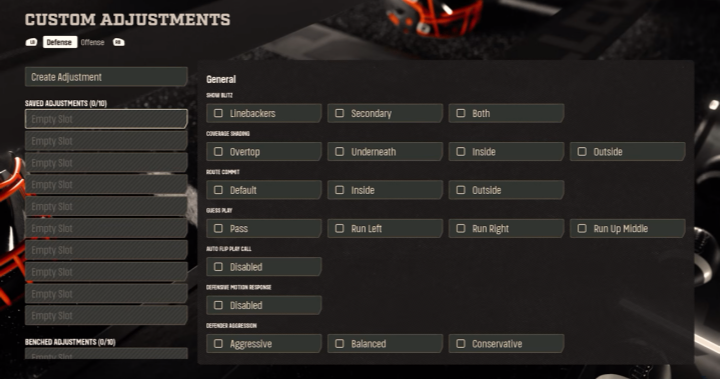
Navigate to your defensive settings and locate the Zone Drops section. College Football 27 provides three major zone drop categories:
Flat zones
Curl zones
Hook zones
For a basic Mabel setup, the most important adjustments are your flat zones and curl zones.
The recommended settings are:
Flat Zones
Flat zones include:
Hard flats
Cloud flats
Soft squat zones
For Mabel coverage, hard flats and cloud flats are generally the best choices.
Set your flat zone depth to:
20 yards
25 yards
30 yards
A 25-yard setting provides a strong balance because it protects against intermediate sideline routes without completely abandoning shorter throws.
This adjustment helps defend:
Corner routes
Deep outs
Crossing routes from the opposite side
Sideline flood concepts
Step 3: Adjusting Curl Flats for Better Coverage
The next important setting is your curl zone depth.
Curl zones are commonly used by purple-zone defenders and are responsible for covering areas between short routes and deeper coverage.
The recommended setting is:
Curl Flats: 5 yards
This gives defenders enough reaction speed to stop quick throws while still allowing them to drop into passing lanes.
Some players may prefer a 10-yard setting for deeper coverage, while aggressive players might experiment with 0-yard zones. However, five yards provides the best overall balance.
With these two settings:
Flat zones protect intermediate sidelines.
Curl flats stop quick outside routes.
Deep defenders protect against explosive plays.
This creates the foundation of your Mabel macro.
Step 4: Building the Complete Double Mabel Defensive Macro
After creating your zone drop profile, the next step is assigning individual defenders.
For example, when running a 3-2 defensive formation, you can customize each position:
Linebackers
Set your linebackers to:
Hook curls
This allows them to protect inside passing lanes and prevent easy middle throws.
Slot Cornerbacks
Your slot defenders should become:
Curl flats
These defenders will sit underneath and attack quick routes.
Outside Cornerbacks
Your outside corners should become:
Cloud flats
These players provide the intermediate sideline protection that makes Mabel coverage effective.
Safeties
Safety assignments depend on your preferred style.
You can choose:
Deep halves
Inside quarters
Cover 2 style rotations
Players who want maximum protection can use deep halves. More aggressive users may prefer inside quarters and manually defend deep throws.
Step 5: Using Macros to Stop the Sideline Flood Meta
One of the biggest advantages of macros in College Football 27 is speed.
Many players previously depended heavily on manual adjustments and switch-stick mechanics. However, early gameplay shows that relying completely on quick switching can be inconsistent.
The popular offensive strategy is the “stem-down corner” concept.
This route combination attacks traditional hard flats because the receiver pushes vertically before breaking outside. The defender often reacts too late, giving the offense easy yards.
A Mabel macro solves this problem.
Once activated:
The short defender stays underneath.
The outside corner drops deeper.
The safety protects against the biggest play.
This forces the quarterback to look toward the middle of the field instead of constantly attacking the sideline.
Step 6: Activating Your Defensive Macro During Games
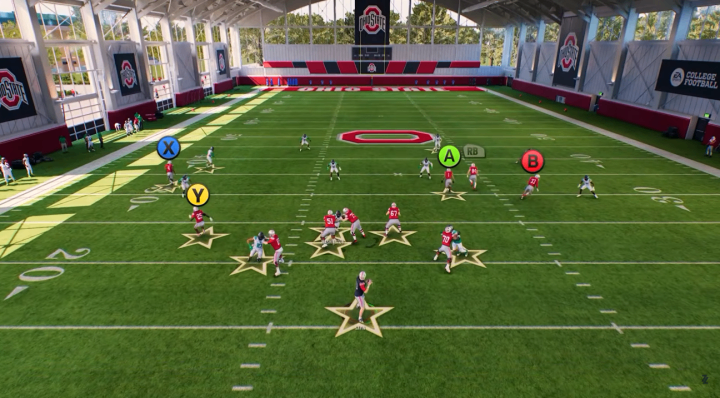
Once your macro is created, using it during a game is simple.
Press the designated macro button (such as L1/LB depending on your platform) to bring up your saved defensive profiles.
Select your zone drop profile.
Your defenders will immediately receive the updated zone depths.
From there, you can make small adjustments depending on the offensive formation.
For example:
If the opponent attacks one sideline repeatedly, activate Mabel on that side.
If they throw deep routes, add safety help.
If they start attacking the middle, adjust your user defender position.
The goal is not to run one coverage every play. The goal is having instant access to defensive answers.
Step 7: Expanding Your Macro System for Advanced Defense
The basic Mabel setup is only the beginning.
Advanced College Football 27 players can create multiple macro profiles:
Left-side Mabel coverage
Right-side Mabel coverage
Cover 3 cloud rotations
Match coverage adjustments
Zone blitz packages
Pressure-focused defensive setups
You do not need every macro to mirror the same coverage.
Sometimes the best strategy is creating specialized profiles for specific situations.
For example:
A third-down macro designed to stop deep routes.
A red-zone macro focused on preventing corner fades.
A pressure macro for forcing quick throws.
The more defensive tools you have available, the harder it becomes for opponents to predict your strategy.
Step 8: Why Macros Are Essential in College Football 27
College Football 27 rewards players who understand defensive customization.
Stock coverage is becoming less reliable because advanced players know how to exploit AI weaknesses. Offensive playbooks contain countless route combinations, buy College Football 27 Coins, and defensive players need the ability to place defenders exactly where they are needed.
Macros close the gap between casual and competitive players.
Even if you are not an expert in:
Match coverage
Man defense
Complex blitz schemes
A properly designed zone macro can immediately improve your defensive performance.
The Mabel setup gives you a simple but powerful solution: remove easy sideline throws, force opponents toward the middle, and let your user defender control the game.
Mastering macros is one of the most important defensive skills to learn in College Football 27. Whether you play online head-to-head, competitive modes, or just want stronger defense against friends, this adjustment system can completely change how you approach every possession.