





Summary
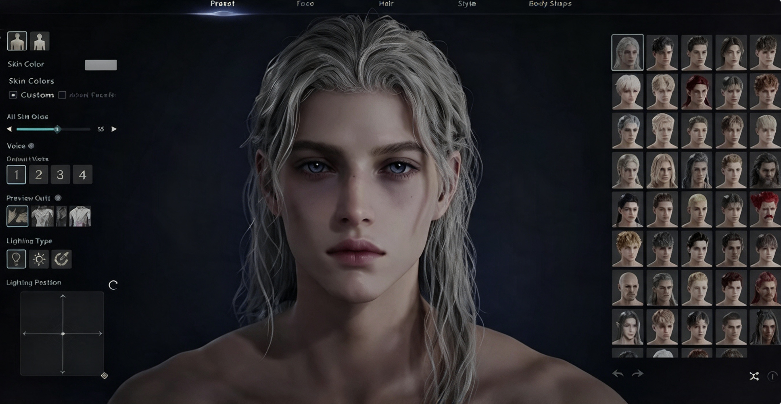
Based on a detailed breakdown of the Aion 2 character customization system, here's a full instructional guide. Whether you're building a unique character from scratch or recreating a specific look, this guide will help you navigate a system with over 200 customization options.
1. System Overview: Why Aion 2's Customization Deserves Attention
Aion 2's character customization is top-tier among MMOs. As noted in the video: "I've actually never seen a game have this much character customization." The system covers:
Gender Selection: | Male or female for every class, no restrictions |
Skin Color: | Any color—orc, purple, whatever you want |
Gloss Factor: | Separate face gloss and body gloss for a "sweat factor" or matte look |
Voice Options: | Not in English yet, but likely coming soon |
Preview Outfits & Lighting: | Adjust lighting position to see your character in specific light |
Massive Presets: | From normal frames to elvish, demonic, and massive builds |
Core Tip: Browse all presets first to find a good starting point before diving into details.
2. Face Settings Breakdown
2.1 Shape
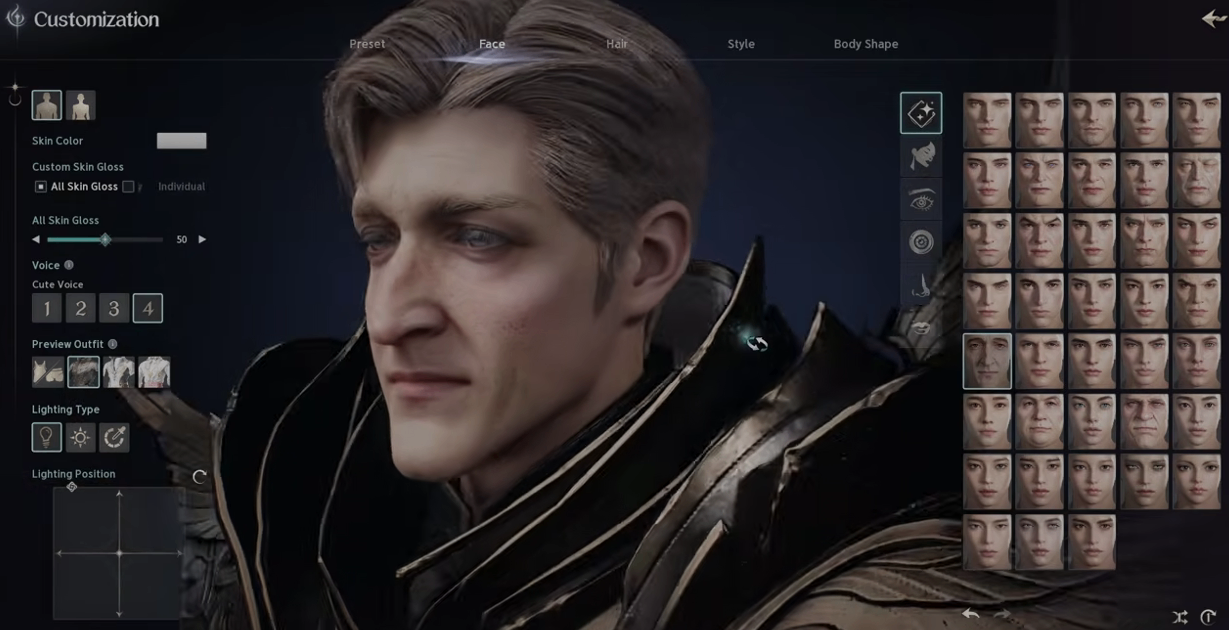
The first tab is Shape. You can swap between many different faces. These aren't just variations of the same template—they change drastically.
Face Type: Moving the slider around changes the character significantly.
2.2 Ears
Ear Positioning: | Slight adjustments |
Ear Size: | Way bigger or way smaller |
Ear Shape: | Pointy or standard (elf ears possible) |
Ear Rotation: | More inward or outward |
Earlobe Length: | Adjustable |
2.3 Chin & Jaw
Chin: | Shape it however you want |
Side Jaw Line: | Slider control |
Lower Jaw Shape: | Full control |
Jaw Protrusion: | Inward or outward |
2.4 Cheeks & Forehead
Cheeks: | Inward or outward |
Forehead: | Inward or outward |
Brow Positioning: | Move up or down |
Distance Between Brows: | Closer or further apart |
Cheekbone: | Inward or outward |
Lower Cheekbone: | Inward or outward |
Cheekbone Height: | Up or down |
3. The Eye System (Most Complex Section)
3.1 Basic Eye Adjustments
Eye Size: | Bigger or smaller |
Eye Positioning: | Move anywhere |
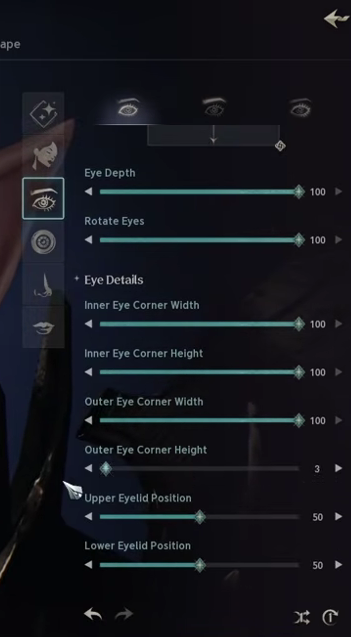
Eye Depth: | Adjust how sunken the eyes are |
Rotate Eyes: | Change angle |
Inner Eye Corner Width: | Up/down, inward/outward |
Width of the Eye: | Outer eye inward/outward |
Outer Eye Corner Height: | Up or down |
Eyelid Positioning: | Up or down (can make closed eyes) |
Lower Eyelid Positioning: | Up or down |
3.2 Eyebrows
Eyebrow Size: | Adjustable |
Eyebrow Color: | Any color, including hex codes |
Intensity: | Can go to no eyebrows |
Eyebrow Positioning: | Move location |
Eyebrow Gloss: | Add shine |
Eyebrow Angle: | Change orientation |
3.3 Eyelashes
Eyelash Length: | Any length |
Eyelash Color: | Any color |
Eyelash Angle: | Can flip up |
Eyelash Intensity: | No eyelashes or super intense |
Lower Eyelash Intensity: | Adjustable |
3.4 Eyeballs
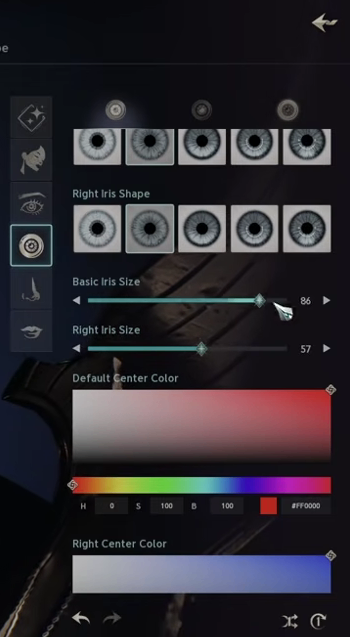
Irises: | Multiple types, can be asymmetrical (different type per eye) |
Iris Colors: | One red, one blue, etc. |
Iris Size: | From full eye to no iris at all |
Default Border Color: | Outer side of iris |
Pupils: | Multiple types—heart eyes possible |
Pupil Color: | Any color |
Default Eye Shine: | On or off |
3.5 Scara (Eye Whites)
Same menus as iris and pupil. Can be asymmetrical.
4. Nose System
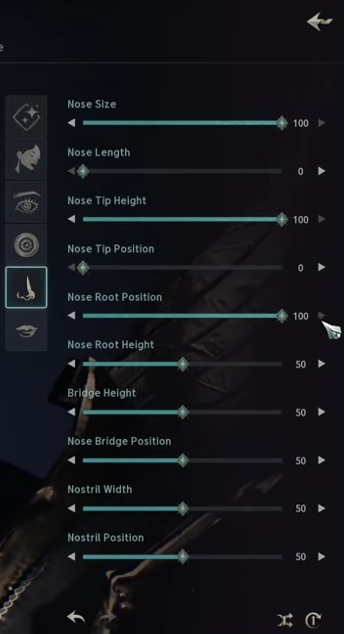
Nose Size: | Biggest to smallest |
Nose Length: | Short or long |
Nose Tip Height: | Outward or inward |
Nose Tip Position: | Up or down |
Nose Root Position: | Unibrow area up/down |
Nose Root Height: | Inward or outward |
Bridge Height: | Inward or outward |
Nose Bridge Positioning: | Up or down |
Nostril Width: | Inward or outward |
Nostril Position: | Up or down |
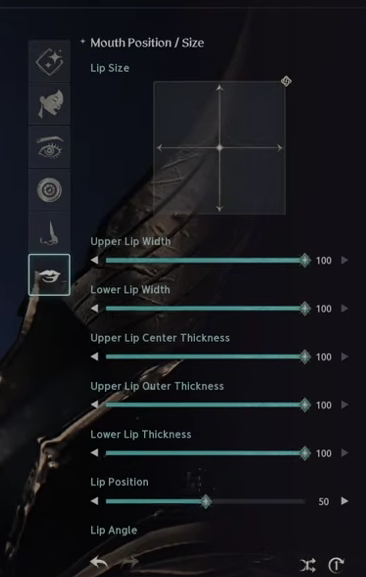
5. Mouth System
Mouth Shape: | Slider control |
Upper Lip Width: | Longer or shorter |
Lower Lip Width: | Longer or shorter |
Upper Lip Thickness: | Center thickness |
Upper Lip Outer Thickness | |
Lower Lip Thickness: | Same options |
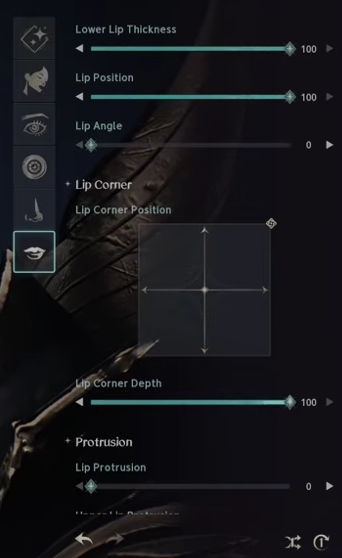
Lip Angle: | Outward or inward (can show teeth) |
Lip Corner Position: | Can make always smiling |
Lip Corner Depth | |
Upper Lip Protrusion: | Inward or outward |
Lower Lip Protrusion: | Inward or outward |
6. Hair & Dyeing
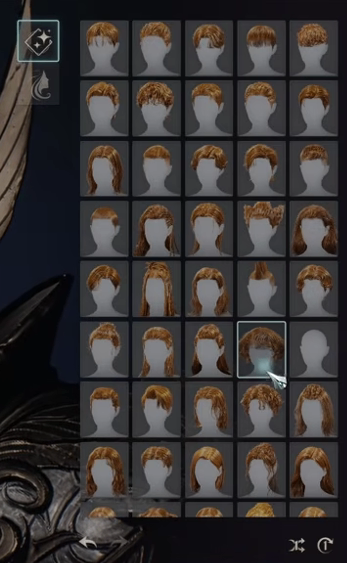
6.1 Hair
Choose from various hairstyles. Likely changeable later.
6.2 Dyeing
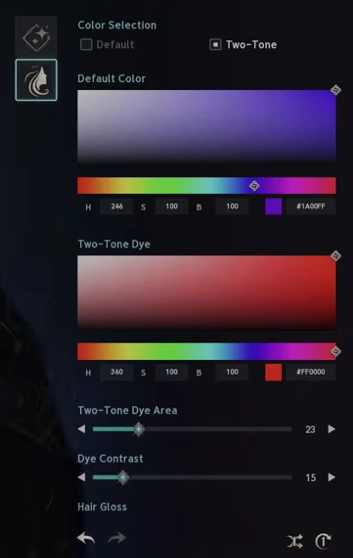
One Tone or Two Tone: | Two-tone available |
Two-Tone Dye Area: | From roots to all the way |
Dye Contrast: | Lowest merges colors (blue + red = purple), highest keeps them separate |
Hair Gloss: | Adds reflection, but uses more PC resources |
7. Makeup & Skin Details
7.1 Style
Presets for your character's makeup.
7.2 Skin Presets
Base for Detail: | Contour shape of the face |
Color & Intensity: | Add makeup at eyes or contour |
Contour Gloss | |
Detail: | Further adjustments |
Highlighter Color, Intensity, Gloss: | Multiple options |
7.3 Eye Makeup
Eyeliner: | Color, Intensity, Gloss, Reflection |
Eyeshadow | Color, Intensity, Gloss, Reflection Glitter Distribution: Slider control Glitter Color, Particle Size, Opacity, Reflection |
Eyeshadow Detail: | More colors, intensity, gloss, reflection, glitter distribution, size, opacity, reflection |
7.4 Lip Makeup
Lipstick: | Color, Intensity, Gloss, Reflection |
Glitter Slider: | A lot or a little |
Size, Opacity, Reflection | |
Shape: | Multiple options with intensity, gloss, reflection, color |
7.5 Moles & Freckles
Moles: | Position, Color, Intensity, Positioning |
Freckles: | Shape, Color, Intensity |
7.6 Face Art & Scars
Face Art: | Scars or face paint—not just face, but body too |
Body Section: | Must go to Undergarments to see |
Seven Options: | Each can change color, positioning, size |
Rotate, Flip Horizontally, Flip Vertically, Copy Symmetrically | |
War Paint: | Color, Intensity, Metallic, Gloss, Accent Color |
Scars: | Position (face or neck), Size, Rotate, Depth |
7.7 Facial Hair
Stubble Type |
Facial Hair Styles |
Facial Hair Color |
8. Body Settings
8.1 Body Shape
Main Presets: | Choose from options |
Body/Head: | Shorter/taller, slimmer/thicker, inward/outward |
Veins Intensity: | Adjustable |
Head Size: | Big or small |
Neck Thickness & Length | |
- Upper Arm Length
- Lower Arm Length
- Overall Arm Thickness
- Tricep Thickness
- Bicep Thickness
- Forearm Thickness
- Hand Size
- Finger Length
- Finger Thickness
- Arm Muscle Definition
8.3 Body
- Shoulder Size
- Trapezius Size
- Rib Cage Size
- Rib Cage Length
- Chest Muscles
- Back Muscles
- Waist Circumference
- Waist Length
- Belly Protrusion: Inward or outward
- Abdominal Definition
8.4 Lower Body
Hip Size |
Leg Thickness |
Thigh Length |
Thigh Thickness |
Calf Length |
Calf Thickness |
Foot Width |
Leg Muscle Definition |
9. Final Check & Class Selection
9.1 Preview & Lighting
Preview Outfits: | See how gear looks |
Lighting Types: | Switch to check |
Lift Hair: | Changes hair effect |
Hide UI: | Get the perfect look |
Face Camera: | Character looking at you or not |
9.2 Class Selection
After finishing customization, choose your class. The video creator thought his character would be best as an Assassin, but every class can be male or female with no restrictions.
10. Quick Reference Table
System | Key Options | Recommended Use |
|---|---|---|
Gender | Male/Female | All classes |
Skin Color | Any color | Orc, purple, etc. |
Gloss | Face/Body separate | Sweat factor or matte |
Ears | Pointy/Standard | Elf look |
Eyes | Asymmetrical iris/pupil | Heterochromia |
Eyebrows | Hex color | Precise color matching |
Eyelashes | Color/Angle/Intensity | Dramatic or natural |
Nose | Tip/Bridge/Nostril | Fine-tuning |
Mouth | Lip shape/Corner/Protrusion | Smile or show teeth |
Hair | Two-tone dye | Gradient or contrast |
Makeup | Eyeshadow/Lipstick/Glitter | High-fashion looks |
Body Art | Full-body tattoos/war paint | Personalization |
Body | Muscles/Skeleton/Proportions | Body customizing |
11. Tips for Beginners
Start with a preset: Don't start from scratch—find a close preset and adjust.
Watch the lighting: Character creator lighting differs from in-game. Use preview options.
Use asymmetry: Iris, pupil, and eye whites can all be asymmetrical for heterochromia.
Hex codes: Eyebrows and hair support hex codes for precise color matching.
Body art is in Undergarments: Full-body tattoos and war paint require going to the Undergarments menu.
Resource usage: Hair gloss increases PC resource consumption—mind your performance.
Take your time: You'll spend a lot of time on your character, so make sure it's perfect.
Conclusion: Aion 2's customization system is incredibly deep. From facial bones to makeup glitter, from body muscles to full-body tattoos, almost every detail can be customized. Mastering this system lets you recreate popular styles like "Pink Fox" or build something entirely your own. Once your character is ready, you may also want to Aion 2 buy Kina to get a head start on gear and upgrades. Enjoy creating your perfect character in the world of Aion.