Weekend Drop -













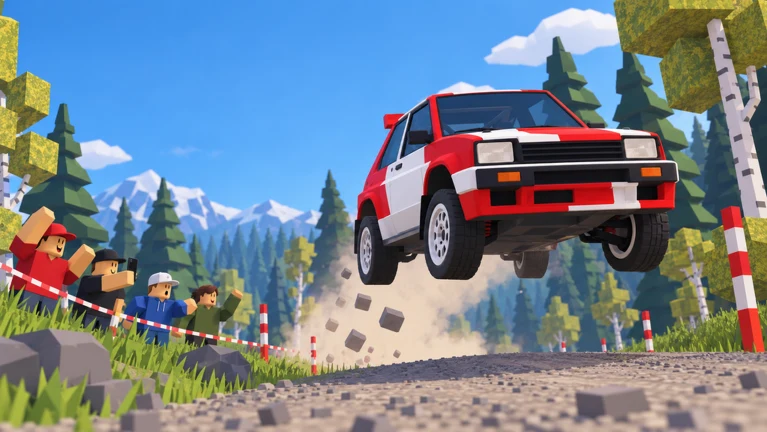
Backseat Rally turns a rally stage into a teamwork challenge: you drive while a human or AI co-driver supplies the calls. The developer describes forest, snow and cherry-blossom routes, with medal chasing and head-to-head racing. Start by checking the code below, then learn the start box, recovery controls and reward screen before chasing faster cars.
1. Latest Backseat Rally Code
The latest code found in the reviewed listings is RELEASE, reported to award 250 CR. Dexerto's October 19 listing and MrGuider's October 18 listing agree on the reward.
| Code | Reported reward | Status at this check |
|---|---|---|
RELEASE | 250 CR | Reported active; no expiry date confirmed |
No expired codes were confirmed in the reviewed lists. That does not mean the current code is permanent.
How to Redeem It
- Open Backseat Rally by No crash plez on Roblox.
- From the main menu, choose Settings.
- Select the GAME tab.
- Enter
RELEASEwithout extra spaces. - Press REDEEM, then check the confirmation and your CR balance.
If redemption fails: check the spelling and whether that account already claimed it. If you have just joined an older session after an update, reconnect once and retry. An expired code cannot be restored by repeatedly submitting it. Never enter your Roblox password into a third-party code page.
Follow the developer's No crash plez community for announcements. Codes for similarly named games are not automatically compatible.
2. Choose the Right Role and Start a Real Run
Co-driving is sharing one car; racing is competing against other cars. Set up the passenger first, then decide whether you want a timed stage or a multiplayer race. Solo play is supported through an AI co-driver using a friend's avatar.
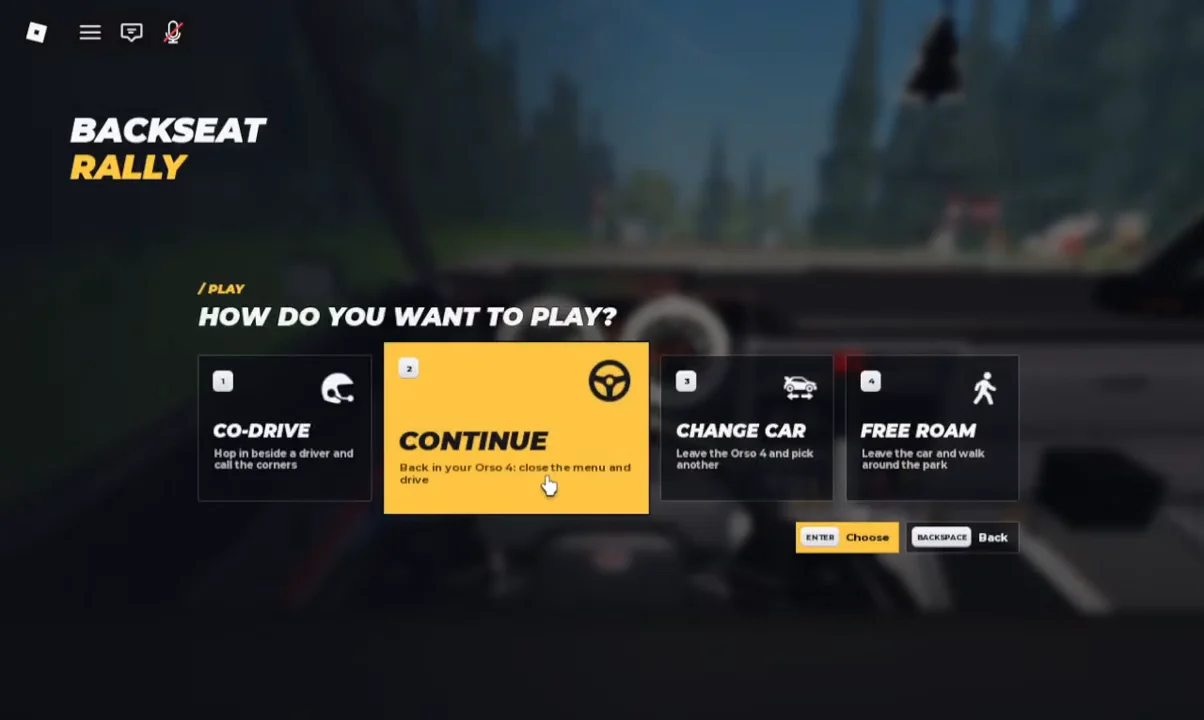
| Selection | What it does |
|---|---|
| Drive / Continue | Start driving or resume your current car. |
| Co-Drive | Take the passenger role and call the approaching corners. |
| Free Roam | Walk around the service park. |
| Races | Configure or join a head-to-head event. |
These functions appear in the Play menu and the separate race interface.
Set Up a Friend or AI Passenger
Open My Garage, select a car and continue to CO-DRIVER. Choose AI CO-DRIVER for solo practice, INVITE for a specific player, or LEAVE SEAT OPEN for another player to join. A human invite needs acceptance; spawning the car is not confirmation that your friend is seated.
Complete the Start-Box Sequence
For your opening attempt, use the starter Orso 4 on Pine Forest. Approach the marked start area and stop inside it. If the panel asks you to start, press Enter; if a countdown is already running, wait for GO.
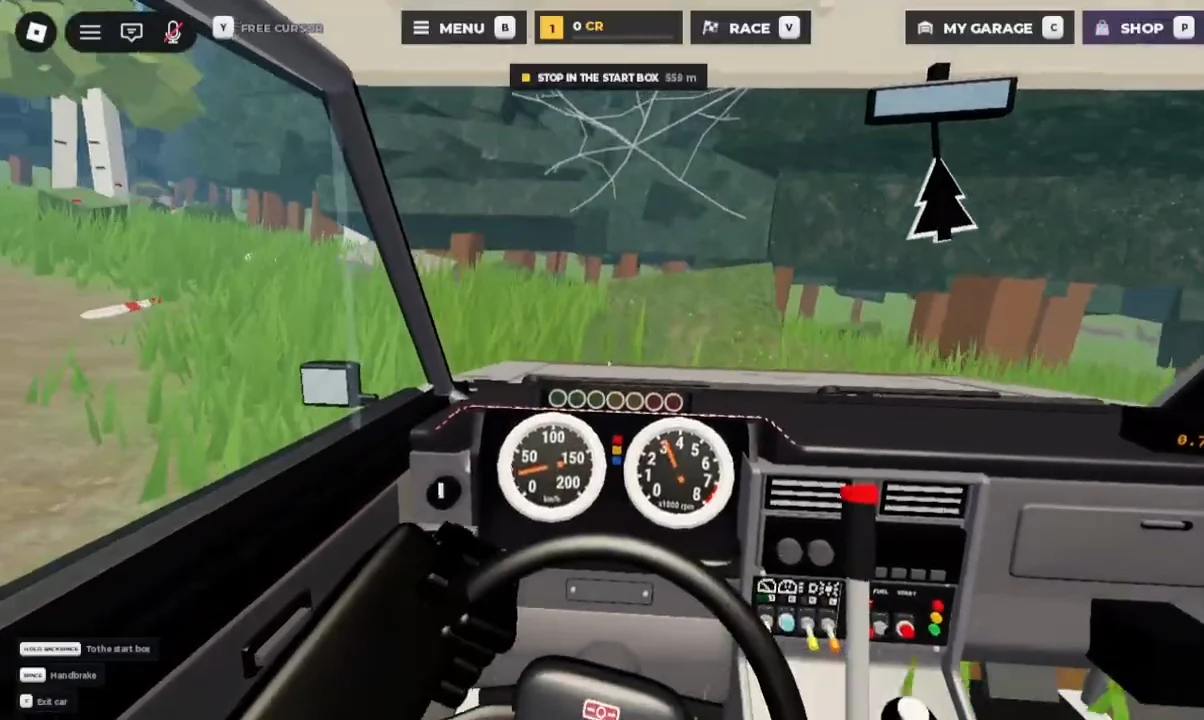
Recommended first-run goal: finish, review, repeat. Do not abandon every attempt after a poor corner. A completed run gives you a baseline for both driving and progression; a string of restarts gives you neither a finish time nor a useful comparison.
3. PC Controls and Recovery: Check the HUD Before Resetting
The documented keyboard controls are below. Recovery changes with the current state, so read its on-screen label before pressing the key. These are PC inputs, not a controller or mobile button map.
| Input | Action |
|---|---|
| W | Accelerate. |
| A / D | Steer left / right. |
| S | Brake; keep holding after stopping to reverse. |
| Space | Handbrake. |
| Enter | Confirm a selected menu option or the displayed stage-start prompt. |
| R | Last checkpoint during a run; return to the start box when that is the displayed action. |
| Hold Backspace | Restart or return to the start box, as labelled. |
| C | Open My Garage. |
| V | Open the Race menu in the captured PC layout. |
The controls guide documents the driving and recovery inputs; the cockpit screenshot confirms Race = V.
If Driver Basics stops advancing, complete the displayed input. The brake lesson requires its S hold; the handbrake lesson asks for Space. Driving farther does not substitute for the requested action.
For practice, use this routine: slow before a tight bend, turn deliberately, then accelerate once your line is settled. Test brief handbrake inputs rather than holding Space through every corner. Change one thing per retry—braking point, steering duration or throttle timing—so you can tell what helped.
4. Co-Driver Calls: Communicate the Bend, Not Just the Direction
Read the arrow and severity together. SLIGHT describes a gentler bend; HARD signals a sharper one. The display can also preview a following turn. A useful call preserves that order rather than shouting two directions at once.
| Cue | Suggested call | Driver's preparation |
|---|---|---|
| SLIGHT + left arrow | “Slight left.” | Prepare a controlled left input. |
| HARD + left arrow | “Hard left.” | Reduce speed before committing to the turn. |
| Left cue, then right arrow | “Left, then right.” | Keep room for the direction change; do not invent a severity for the second bend. |
The meanings come from the displayed cues; the phrasing and preparation are recommendations.
Agree on this vocabulary before starting. Give the warning while the driver still has time to respond, and keep unrelated conversation out of difficult sections. If a call arrives too late, change the timing on the next attempt rather than immediately changing cars.
For solo practice, the AI navigates; it does not take over driving. You still manage speed, steering and braking.
5. How to Get CR Without Confusing It With XP
Completing stages earns CR and account XP. The important distinction is that CR is a spendable balance, while XP advances the account levels used by level-gated cars.
Check Contracts before choosing a route. Then read the post-run breakdown: a stage finish, medal bonus, clean-run award, first-gold reward, daily-first reward, completed contract and level-up credits can be separate entries. Not every entry repeats on the next attempt.
| Route | How to use it sensibly |
|---|---|
| Reported code reward | Try the listed code once; do not budget it as recurring income. |
| Completed stages | Establish a route you can finish reliably. |
| Contracts | Choose runs that advance the objective currently displayed. |
| Medal and clean-run bonuses | Improve consistency before chasing a risky time target. |
| First-time / progression awards | Separate these from ordinary repeat-run earnings. |
The code and gameplay reward routes have different conditions. Inspect the actual result rather than assuming every source pays every run.
Do Not Turn One Large Payout Into a Farming Promise
One captured Alpine Pass result shows 592 CR, but it includes 150 CR from a contract and 250 CR from two level-up awards, as well as other bonuses. It is not evidence that every Alpine Pass finish pays 592 CR.
For your own comparison, record three completed runs, their awarded CR and the full time spent—including restarts. Separate non-repeatable bonuses. Prefer the route that gives you consistent results, not the one with the largest lucky-looking settlement.
Optional Purchases Are Different Products
The developer's current store lists a one-time Starter Pack with 2,500 credits, a Works crate and exclusive rims, and VIP described as doubling credits from completed stages. These are paid options, not requirements for redeeming the code or following the stage-completion route. Do not assume VIP doubles codes, contracts or every other credit source.
6. Unlock Cars Through the Right Progression System
Before saving CR for a locked car, inspect its Change Car card. The developer sells early-access unlocks for vehicles including Freccia HF, Rascal S, Saetta HF and Kaze RS, explicitly describing them as access before the normal level requirement. That is a different purchase from a Credits bundle.
Recommended upgrade process: finish stages, check the next account-level gate, then compare the newly available car on a familiar route. Keep the route and your driving approach similar. Judge the result by clean finishes and repeatable times, not only the largest speed figure.
Be careful with cosmetic spending. The developer describes Clubman, Wheel and Works crate contents as rim, tyre or glove cosmetics. Do not buy a cosmetic tyre expecting it automatically to improve snow grip. Read actual performance-part descriptions separately.
7. Host a Race Without Making Practice Harder
Open RACES and inspect the settings before hosting. The captured menu includes access permissions, collision settings, an entry-fee display, 2–6 racers, and class choices from Any through specific classes and Stock.
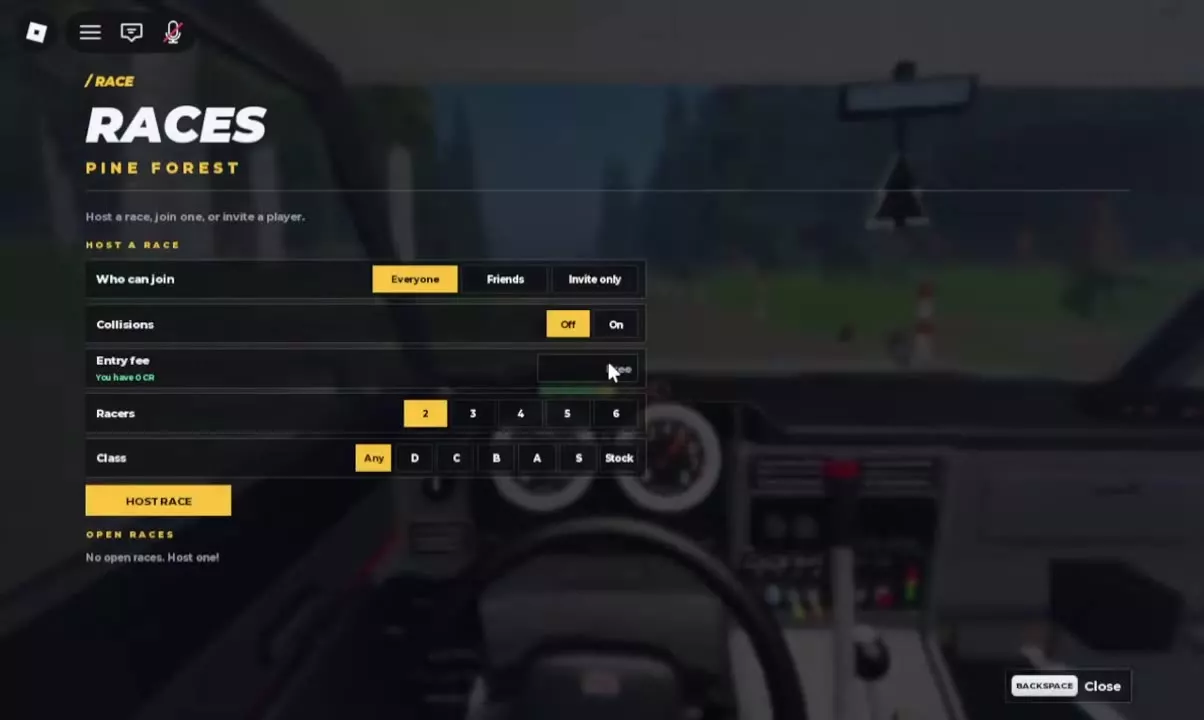
For a first session with friends, my recommended setup is Friends or Invite only, Collisions Off, and a class that everyone can enter. Keep the fee free where offered. This removes unnecessary contact and equipment mismatches while you learn the course.
Having a friend in the passenger seat does not mean they are a separate rival car. Arrange the driver/co-driver pairing independently from the race roster.
8. Next Update: October 23 Weekend Tournament
The developer has scheduled UPD + Weekend Tournament for approximately 20:00 UTC on October 23 to 07:00 UTC on October 26, 2026. As of this guide's October 21 check, this is an upcoming event—not a mode already verified live.
| Announced addition | What players should prepare for |
|---|---|
| Hourly weekend tournaments | Check the in-game schedule and join the appropriate round. |
| Class-based first-place rewards | Exclusive tournament gloves; the listing says S class receives the best pair. |
| New map | Learn the route before attempting an aggressive medal run. |
| New Group B car | Check its actual unlock requirement when released. |
| Engine swaps, parts and customization | Read the deployed options before spending resources. |
The additions and reward outline are confirmed by the developer's event listing. It does not provide the new map's name, the new car's price or a new redemption code.
Preparation recommendation: practise in a car you can control, improve your calls and choose a suitable class. Owning a quicker car is not a substitute for completing a clean stage.
9. Quick Answers
Can I play Backseat Rally without a friend?
Yes. Select the AI co-driver option and handle the driving yourself. Human co-op and head-to-head racing are additional choices.
Are CR and Robux the same currency?
No. CR is the experience's credit balance; Robux is used for optional purchases such as Credits bundles and early car unlocks.
Is this the Backseat Rally charity event?
No. A separate hitchhiking charity event has used the same name. This guide covers the Roblox experience created by No crash plez, not travel-event registration.
Your first-session route: check the code → select a car and passenger → finish a stage → inspect CR and XP → improve one driving mistake → repeat toward your next unlock.