Weekend Drop -













This guide will demonstrate how to use this feature to drastically improve your run blocking and create larger running lanes in College Football 26.
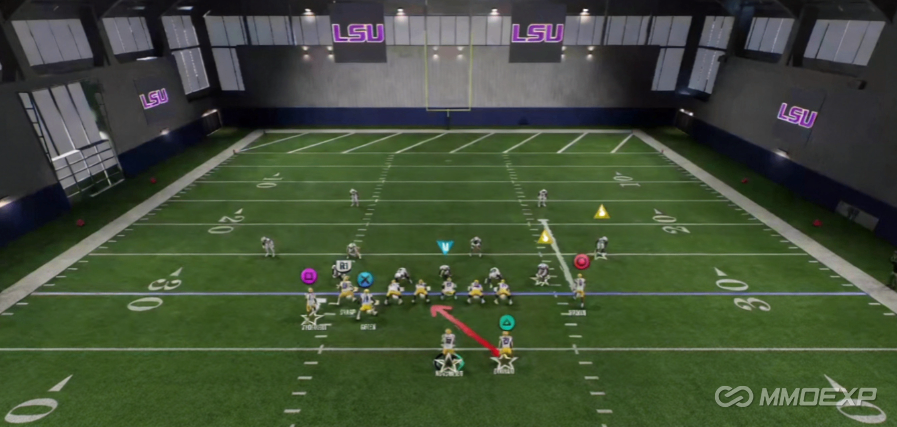
What ID the Mike Does in the Run Game
In the passing game, ID the Mike allows you to identify the middle linebacker for your offensive line to block. In the run game, the feature serves the same fundamental purpose: it tells your offensive line which defender to prioritize. Changing the identified defender alters blocking assignments, which can turn a minimal gain into a significant play.
Basic Example: Inside Zone Run
Consider a simple inside zone run out of shotgun. The Oregon State playbook is used for this example, but inside zone runs are available in most playbooks.
By default, the M icon is highlighted over the linebacker on the left side. This defender is identified as the Mike. When the ball is snapped with no adjustment, the linebacker on the right side is able to disrupt the run.
To change who is identified as the Mike, bring up the pass protection menu. Press the button for ID the Mike. Use the stick to scroll through defenders and select a different player. The M icon will appear over the selected defender.
When the linebacker on the right side is identified instead, that defender becomes blocked properly. The offensive lineman assigned to him takes him out of the play, allowing the runner to cut back for a significant gain. Instead of being tackled a few yards downfield, the runner potentially breaks free for a touchdown.
Using the Blocking Assignment Menu
To use ID the Mike to its full potential, pull up your offensive line blocking assignments. Press L2 to bring up the menu on the right side of the screen. Move the stick to the left to display your blocking assignments. This allows you to see exactly which defenders each offensive lineman is assigned to block by default.
This menu helps you diagnose problems before the snap. You can see which defenders are unblocked or which blocking assignments are likely to fail.
Example Against a Four-Down Line (Single Mug)
Against a four-down line with a single mug alignment, the default identified Mike is the linebacker directly over the center. When the ball is snapped with this default setting, the linebacker over the center gets blocked, but the linebacker directly behind him has a free path to the runner. If that defender is controlled by a user, the run can be disrupted every time.
To fix this, change the identified Mike to the linebacker who came free on the previous play. After making this change, the center gets downfield and picks up that linebacker. Additionally, the guard becomes involved in the blocking scheme. The center and guard work together to create a large hole. Changing who was identified turns a minimal gain into a substantial play.
When you pull up the blocking menu with the default linebacker identified, you see a combo block on the right side. After changing who is identified, that combo block is no longer present. The blocking assignments are completely rearranged.
Using ID the Mike on Defensive Backs
ID the Mike is not limited to linebackers. It can also be used effectively on defensive backs, particularly when trying to run to the outside.
Against a double mug alignment with a linebacker stacked in the A-gap, the default identified Mike is that A-gap linebacker. When the ball is snapped with this default, the run may be adequate but not optimal. The issue is that a wide receiver is blocking down initially rather than immediately engaging the cornerback. To burst outside for a significant gain, the receiver needs to block the cornerback immediately.
Identify the outside cornerback as the Mike. After making this change, the receiver immediately releases to block that cornerback. The edge is sealed, and the runner can burst outside.
Advanced Technique: Combining ID the Mike with Untarget Defender
Against certain defenses, the most effective approach combines ID the Mike with the untarget defender feature. Untarget defender is accessed by flicking the right analog stick up, then moving the flame icon to select a defender to leave unblocked.
Consider a 3-4 defense where the goal is to run to the outside. By default, the blocking assignments are decent, with combo blocks on the inside linebackers. However, the inside linebacker on the right side could potentially shoot through a gap. If the objective is to get outside, this linebacker is not the primary concern.
First, untarget the inside linebacker on the right side. This removes him from the blocking scheme entirely. Second, identify the cornerback on the outside left as the Mike. After these adjustments, no offensive lineman is assigned to block the right-side linebacker. The runner can get outside more easily.
When the ball is snapped, several things happen. A combo block seals the edge immediately. The next level of blockers pick up the linebacker on the left who could potentially get through. The linebacker on the right is left unblocked, but because the runner is heading outside, that defender runs himself out of the play.
With three defenders on the edge, the offense has three blockers. The tight end gets downfield on the safety, the receiver blocks the cornerback, and the runner bursts outside for a significant gain.
Summary of Key Techniques
Change the identified Mike to the defender who is disrupting your run. Use the blocking assignment menu (L2) to diagnose blocking issues before the snap. Against four-down lines, identify the linebacker behind the center rather than the one directly over him. When running outside, identify the cornerback to ensure your receiver blocks him immediately. For advanced adjustments, combine ID the Mike with untarget defender to leave certain defenders unblocked while sealing the edge.
Final Recommendation
Players who claim ID the Mike does nothing in the run game are incorrect. This single adjustment, when used correctly, can dramatically change your blocking assignments and transform your run game. For players looking to build a stronger roster, College Football 26 Coins are essential, and you can obtain them safely through MMOEXP. Implement these techniques in your games and observe the difference in your running lanes.