Weekend Drop -













Returning to Enshrouded 1.0? Choose your route first: restart to experience the revised opening, or continue an existing save to preserve your progression.
Restarting players should rebuild their early crafting and traversal tools; continuing characters should reassign refunded skills before leaving base.
This guide covers both returning-player routes. Cinder's Cradle and Flame Level 10 are late-game targets, not your opening objectives on a fresh character.

Choose Your Return Route
An Enshrouded old save remains usable after release. The developers encourage a fresh start to experience the revised opening hours, but restarting is optional.
Your Situation | Start Here | Next Goal |
Restarting with a new character and world | Follow the restart loop below | Restore crafting, survivors, and traversal |
Continuing an unfinished world | Run the five base checks | Resume your next regional main quest |
Finished the previous regions | Run the checks, then follow the Cinder's Cradle route | Strengthen to Flame Level 10 |
Restart with a Fresh Character
Use this priority order while rebuilding; the Blacksmith is not a prerequisite for every traversal recipe:
1. Place a Flame Altar and Workbench. Establish a small working base before investing in a permanent build.
2. Rescue and summon the Blacksmith. Track Find the Sleeping Survivor, awaken him in his Ancient Vault, then place him at home with the Summoning Staff.
3. Craft a Glider and Grappling Hook. Check Workbench recipes as materials become available. Make short Shroud trips with an exit planned; leave before the timer expires.
4. Clear reachable Shroud Roots and continue main quests. Spend the extra skill points, rescue further survivors, and strengthen the Flame as each regional gate requires.
Recheck early chests and crafting menus: 1.0 adds equipment opportunities in Springlands and Revelwood and reworks early recipes. Flame upgrades now unlock the next tier's armor recipes. Old resource lists may send you gathering unnecessarily.
Keep following regional progression until Veilwater Basin and the next Flame upgrade are relevant. Then join the Cinder's Cradle route below. Your past playtime does not replace the new world's progression.
Continue an Existing Save
Before loading, close the game and copy your existing character and world save files to a separate backup folder. For a hosted world, have the host preserve the server save too.
Saves from version 0.8 or earlier are backed up and converted automatically when first detected by 1.0. In both character selection and world selection, check the separate local and Steam Cloud tabs before assuming anything is missing.
The Windows local-save folder is `%USERPROFILE%\Saved Games\keen games\Enshrouded\default`. Cloud and server storage need separate checks.
What's New in Enshrouded 1.0
System | Change | Your First Action |
Character and equipment caps | 45 to 50; fully upgraded gear 50 to 55 | Keep useful gear while replacing weak slots |
Skill tree | Existing allocations reset | Spend returned points before combat |
Northern region | Cinder's Cradle and floating islands | Complete the Flame and researcher quests |
Magic and ranged equipment | Nine new spell types; upgradeable eternal spells and arrows | Check crafting-survivor unlocks |
Building and storage | Airborne Architect, Sparkworks, chest upgrades and names | Prepare storage for resource runs |
Five Checks before Leaving Your Base
For an existing Enshrouded character, check these before departure:
1. Confirm your progress. Check your character level, inventory, base, and journal. If the world is unfamiliar, check the other save tab before changing anything.
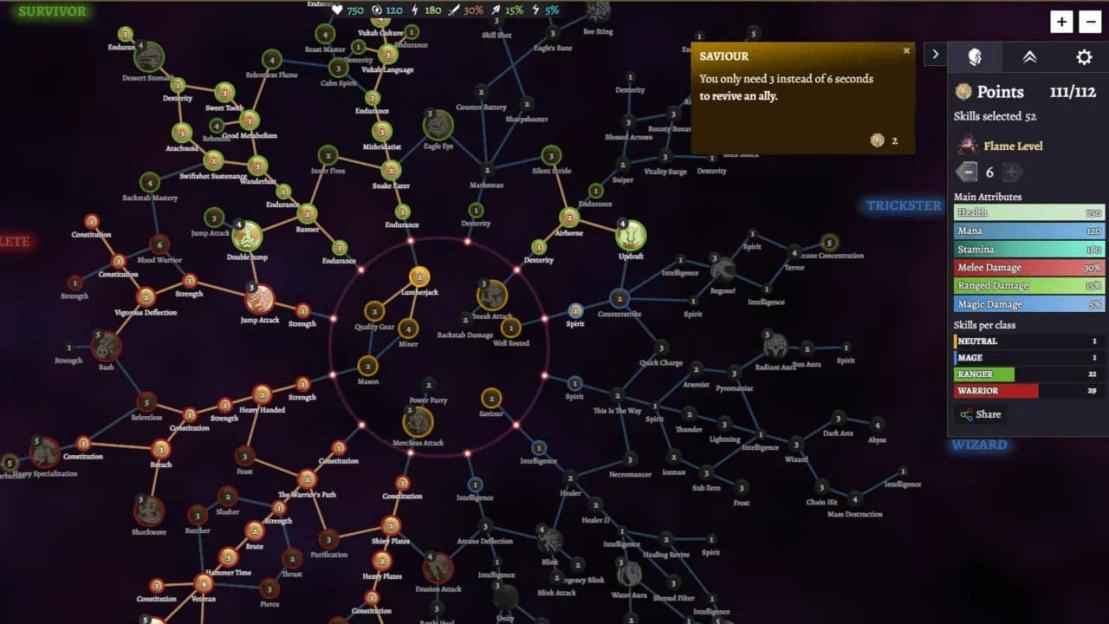
3. Review equipment and controls. Check upgrades, armor bonuses, gems, and supplies. Custom bindings were reset, so test movement and combat inputs near home.
4. Review settings. Check automatic collection and ask your host to review Updraft charge duration if you preferred its old instant behavior.
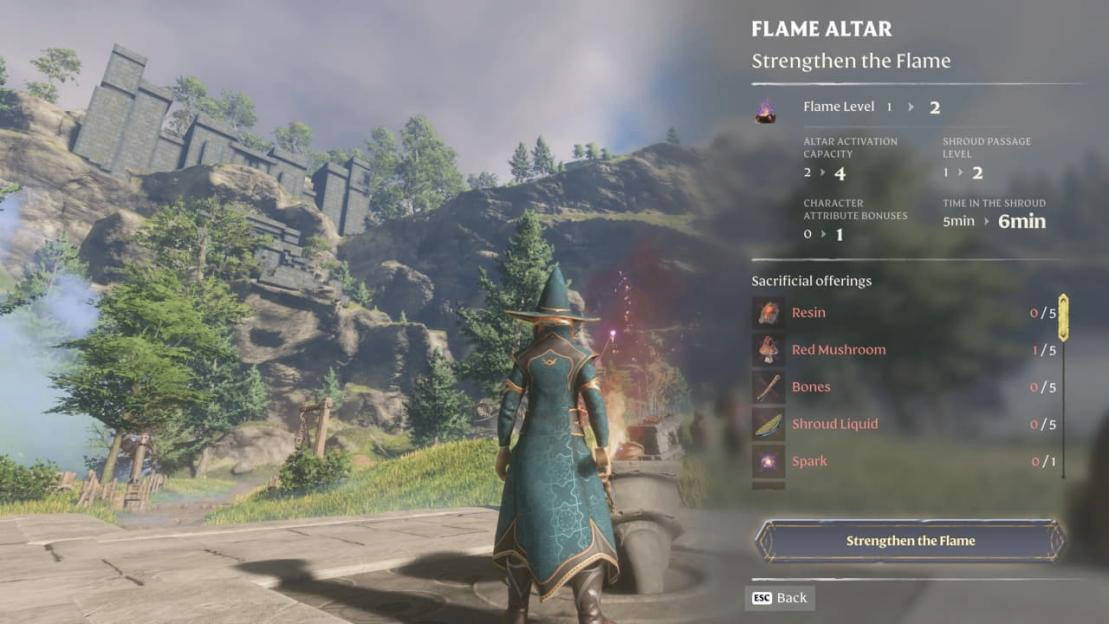
5. Inspect progression. At your Flame Altar, read the next strengthening requirement, then check your main quests. Note the missing offering or objective.
Before spending upgrade materials on Enshrouded Items, replenish food, healing, and ammunition or spell charges. Pack your traversal tools and leave decorative materials behind. Test your rebuilt character against familiar enemies before a distant expedition.
If you stopped before Veilwater Basin, resume your unfinished regional progression. Character levels do not replace missing Flame upgrades or quests.
How to Unlock Cinder's Cradle
Find the Northern Entrance
Cinder's Cradle lies north of Veilwater Basin, beyond the Ancient gate. Lava, ruins, and Shroud cover the lower terrain; floating islands form the upper region.
For a returning Enshrouded character, finish the preceding Flame progression, complete the crown objective, strengthen to Level 10, and follow the gate quest. Optional dungeons can wait.
Complete Crown of Sorrow
The quest journal text identifies Crown of Sorrow as the relic-and-Flame step. Its objectives give you this sequence:
1. Track the quest and locate Gateway Outpost Endflame. Cromville Throne Room is approximately 150 meters northeast of the outpost; use that landmark to orient yourself toward the quest marker.
2. Search inside for the Broken Guard of the North Crown and collect it.
3. Return to a Flame Altar and complete the Flame upgrade using the relic and the other required offerings.
Published recipe lists disagree on some quantities and ingredients. Use your altar's displayed requirements for the complete material list; collecting the crown alone does not finish the upgrade.
If Crown of Sorrow is absent, check unfinished main quests and your Flame level. The complete trigger chain for every old-save state remains unconfirmed; do not assume one NPC conversation will unlock it universally.
Strengthen the Flame to Level 10
Use Strengthen the Flame at the altar. Expanding its construction area does not unlock the same world progression.
Level 10 is the pre-entry target and raises the altar allowance to 15. Level 11 later permits 16 altars and, under the default requirement, allows altars to push back the Shroud. You do not need that final building unlock before beginning Cinder's Cradle.
Confirm the upgrade before returning to the gate. If the approach still presents deadly Shroud, retreat and review your Flame progression and tracked objective. Healing and damage cannot replace the missing protection.
Follow Land of the Sky Islands
The opening region quest, Land of the Sky Islands, supplies the next checkpoints:
1. Reach the Ancient Gate, approximately 610 meters north of Drak'Dal Temple, and proceed into the region.
2. Travel toward the central platform, Cinder's Ascent.
3. Search approximately 80 meters south of Cinder's Ascent for Loraine Crim's soul, the Ancient Researcher you need to rescue.
4. Summon Loraine Crim at your base with the Summoning Staff, then speak to her about continuing.
If the platform is inactive, continue the researcher objectives. Finding her soul is followed by summoning her at your base and speaking to her; reaching the platform alone does not power it.
Activate the Floating-Island Teleporter
Loraine's next quest, Activating the Gate to the Stars, explains the missing power:
1. Use the marked Springlands Dungeon Entrance in Cinder's Cradle. The regional name does not mean you should travel back to the Springlands overworld.
2. Complete the museum-like Springlands beacon dungeon and activate the beacon at its end.
3. Complete the remaining five beacon dungeons, activating a beacon in each. Their entrances are all in Cinder's Cradle and marked on your map; after the first dungeon, their order is your choice.
4. Return to Loraine Crim after all six beacons are lit. Continue with Cinders of the End, which directs you to use the powered platform at Cinder's Ascent to reach the floating islands.
If the teleporter still lacks power, check for an unfinished beacon dungeon. A complete room-by-room walkthrough of those dungeons remains unconfirmed here.
Prepare for the Level 50 Endgame
In Enshrouded 1.0, the character cap is 50; Level 55 refers to fully upgraded equipment. Neither cap is a requirement for your first trip into the region.
Compare Enshrouded Items for upgrades by the problem they solve: weapon damage if fights drag on, protection if routine hits are dangerous, or consumables if supplies run low. Check newly unlocked recipes before committing resources to a full replacement set.
Revisit crafting survivors after strengthening to check newly unlocked armor. The new region also adds tools, food, and consumables.
Repair your kit, activate food buffs, and carry healing, a glider, and a grappling hook. Keep spell charges or arrows stocked until suitable eternal versions are unlocked.
Rebuild Your Skills after the Reset
Mage and Necromancer Options
Enshrouded 1.0 adds nine spell types covering damage, control, utility, and summons. All spells now have eternal versions, with many arriving in the highest progression tier. Eternal spells and arrows can also receive upgrades through the relevant crafting survivors.
Restore your attack and mana support first. Test new spells, skeleton summons, and Necromancy gems against ordinary enemies. Check current minion limits. Wands have an immediately available heavy attack; evasive and aerial attacks require skills.
Combat, Movement, and Building Priorities
Use these priorities when rebuilding:
Playstyle | Restore First | Test Next |
Melee | Your weapon's damage support and survivability | Blocking and your ability to survive a counterattack |
Bow | Ranged damage and stamina support | Revised targeting options and ammunition upgrades |
Mage | Main attack and mana sustain | Control spells, summons, or wand abilities |
Builder | Enough combat capability for resource trips | Airborne Architect for difficult construction work |
Airborne Architect costs three points in the tree's center. Activate it with Z + Space on keyboard inside a Flame Altar boundary; check your bindings first. Flight ends outside that area.
Choose Your Next Exploration Target
Check your current Flame level and skill-point needs before choosing your next Enshrouded expedition.
l Need new-region progression? Continue the Flame and researcher quests before optional dungeon runs.
l Need more skill points? Revisit the expanded map edges in older regions, which contain six additional Shroud Roots. Cinder's Cradle adds another 12 as you explore it.
l Want a dungeon challenge? New Hollow Halls are available in Albaneve Summits and Veilwater Basin. Bring a dependable group where possible and underwater preparation for Veilwater. Solo players should avoid treating an unfamiliar hall as a quick resupply stop.
Choose a hall when you have time and supplies; neither is established here as mandatory gate preparation.
Enable Useful Quality-of-Life Features
Reserve storage space for Cinder's Cradle resources before crafting the next tier of Enshrouded Items. Name chests by material or purpose. Use Enhance to upgrade a chest or convert it to a magic chest in place with the required materials, without emptying it first. Custom map markers can also be renamed; they are personal.
Automatic collection in Enshrouded gameplay settings handles nearby scattered loot. You can also hold the interaction button to collect loose drops. Containers, defeated enemies, and special quest items still require separate interaction.
The host controls Updraft charge duration in world settings. Review it before relying on an old gliding routine.
Sparkworks tools and interactive props connect inputs and outputs in a graph editor, letting levers open passages or pressure plates trigger encounters. This optional building project can wait.
Fix Common Problems after Updating
Problem | First Action |
Skill points appear missing | Open the reset tree and check unspent points before assuming progress was deleted |
Old character or world is absent | Check both local and Steam Cloud tabs on each selection screen |
Cinder's Cradle approach remains deadly | Confirm Flame Level 10 and review the tracked main quest |
Crashes after updating | Install current updates; hotfix 1.0.0.1 includes random-crash and peripheral-related fixes |
World edit button does nothing | Subscribe to an adventure in Adventure Sharing, then retry editing |
Room reverb or lore playback makes audio behave incorrectly | Keep in-game master volume at 100% and adjust output volume through Windows sound settings |
The edit-button workaround was published by Keen for an issue introduced with hotfix 1.0.0.1 on October 15. It is a temporary workaround, not a reason to replace your world.
The audio workaround applies to the reverb and gameplay-volume issues Keen identified when master volume is below 100%. Use it temporarily if affected; it is not a fix for every sound problem.
For continuing Enshrouded performance problems, let startup shader compilation finish, then compare one location while changing one graphics option at a time. This is general troubleshooting, not a confirmed stutter fix. Report persistent crashes with your build, hardware, and reproduction steps.