







Tired of watching that catch meter pop up when you just want to make a clean grab? Finding the new Timing-Based Catching system more annoying than helpful? Or are you simply looking for the classic Madden catching experience again? You can turn it off in just a few settings, either globally across the game or only inside your Franchise save. The choice is yours. You can even disable defensive timing-based catching while keeping the offensive version active, giving you more control without completely removing the new mechanic. If you’re also saving resources to buy Madden 27 coins or looking for cheap mut coins, getting your settings right first can make every game feel smoother.
Kill the Catch Meter in the Main Menu
If you want Timing-Based Catching disabled everywhere, head to the gear icon from the main menu and open Edit Settings.
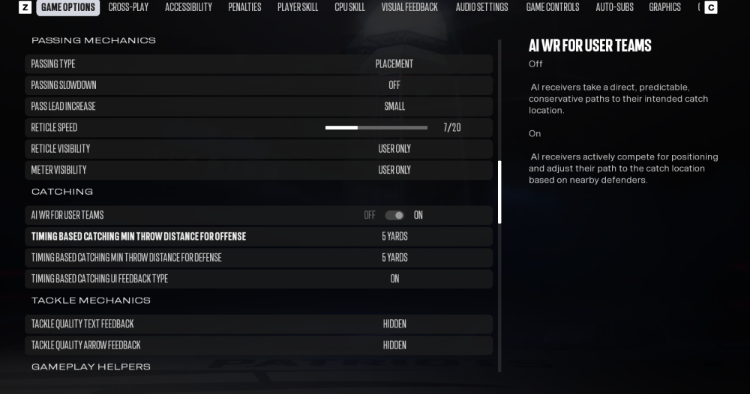
Next, enter Game Options and scroll down until you reach the Catching section. You’ll find two settings related to the new system:
Timing-Based Catching Min Throw Distance For Offense
Timing-Based Catching Min Throw Distance For Defense
Turn both settings off. Once disabled, the timing-based catch mechanic will no longer be triggered for either side.
Value for You:
Best for new players and classic Madden fans — remove the timing mechanic globally and return to a more familiar catching experience.
Only Want It Gone in Franchise? No Problem
You don’t have to disable the feature everywhere. If you mainly play Franchise, you can change the setting directly inside your existing save.
Load your Franchise file, switch to the Options tab from the main menu, then open Game Options. Scroll to the Catching section and turn off the same two Timing-Based Catching settings.
This lets you customize your Franchise experience without necessarily changing how the mechanic works in other modes.
Value for You:
Best for Franchise players and casual grinders — customize one game mode without affecting your preferred settings elsewhere.
What Does Timing-Based Catching Actually Do?
Timing-Based Catching is a new system that puts more emphasis on player input instead of ratings alone. When the ball approaches, a progress meter appears above the receiver. You hold the catch button and release it when the meter reaches the green zone.
Hit the timing correctly, and even a lower-rated receiver can make difficult catches more consistently. Miss the timing, however, and the mechanic can feel awkward—especially if you’re used to traditional Madden controls.
Value for You:
Best for players learning the new system — understand why the mechanic exists before deciding whether you actually want to disable it.

Want Less CPU Cheese? Disable Defense Only
You don’t necessarily have to turn off both settings. If your main complaint is the CPU making ridiculous interceptions, try disabling defensive Timing-Based Catching while keeping offensive Timing-Based Catching active.
This gives you the new catch-timing experience on offense while reducing the chance of CPU-controlled defenders benefiting from the same mechanic.
It’s a useful middle ground if you enjoy the new system but feel that defensive AI is becoming a little too cracked.
Value for You:
Best for competitive players and online grinders — preserve offensive control while reducing frustrating defensive catch interactions.
Still Too Many CPU Interceptions? Adjust the Sliders
If turning off defensive Timing-Based Catching isn’t enough, there’s another option. Head into the gameplay settings and adjust the CPU Skills sliders related to catching and interceptions.
A starting range of around 25–40 can help tone down CPU performance without completely removing the challenge. From there, make small adjustments until the AI feels competitive without becoming frustrating.
Don’t blindly copy someone else’s slider setup, though. Your difficulty level and play style can make a big difference.
Value for You:
Best for offline players and Franchise users — reduce excessive CPU interceptions and create a difficulty level that feels more natural.

Closing
Turning off Timing-Based Catching in Madden 27 is straightforward. Go to Edit Settings → Game Options → Catching, then disable the offensive and defensive minimum throw-distance settings. Franchise players can make the same adjustment directly from their save.
If you like the new skill-based system, keep it on. If you prefer classic Madden catching, turn it off. And if CPU interceptions are your biggest headache, try disabling the defensive setting only or lowering the relevant CPU Skills sliders. Madden 27 coins on MMOexp to level up faster and stay ahead.