Keeping rosters updated is one of the easiest ways to make Madden 27 feel more authentic, whether you're playing Franchise or simply testing new lineups. Madden NFL 27 provides official weekly roster updates through the Creation Center, while custom rosters give players even more freedom. If you're also building your Ultimate Team lineup, buy Mut 27 coins at MMOEXP to level up your game and strengthen your roster-building options.
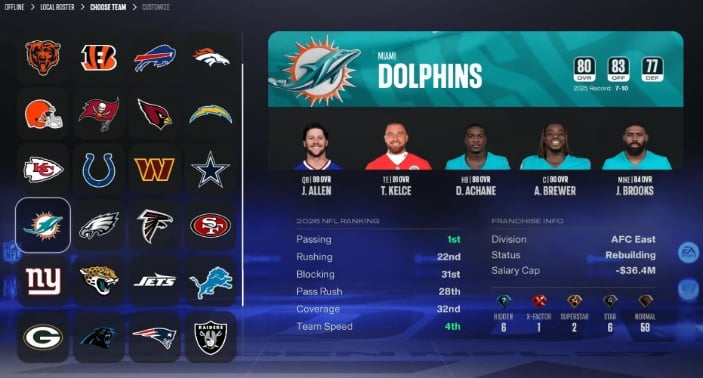
How to Update Madden 27 Rosters in Seconds
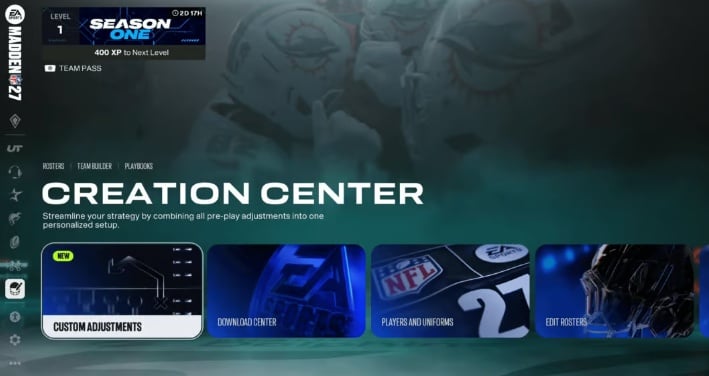
Updating your roster is straightforward, but choosing the correct menu is important. According to the guide, the official update process takes place through the Creation Center.
Follow these steps:
1. Open the Creation Center from the Madden 27 main menu.
2. Select Edit Rosters.
3. Choose Update Rosters.
4. Select Download.
5. Wait until the download finishes completely.
The download itself should be relatively quick when your internet connection is stable. Most importantly, don't shut down your console or disconnect from the internet while the update is downloading, as interrupting the process could cause roster problems.
Key Takeaway: Use Edit Rosters → Update Rosters → Download when you want the official EA roster file.
Why Weekly Roster Updates Actually Matter
Roster updates aren't simply cosmetic. EA Sports releases updated roster files throughout the NFL regular season and playoffs, reflecting real-world developments such as trades, free-agent signings, player cuts, and practice-squad moves.
Player ratings can also change based on performances during the season. That means an outdated roster could leave you using incorrect lineups and old player ratings.
For Franchise players who want their virtual league to mirror the real NFL, regular updates are particularly important.
Key Takeaway: Updating regularly keeps your teams closer to real-world NFL rosters and prevents your Franchise from becoming outdated.
After downloading an update, check your team's depth chart manually. Automatic depth-chart decisions aren't always perfect, so your preferred starters may need to be restored.
Custom Rosters: Create Your Own NFL Universe
Official rosters aren't your only option. Madden 27 also allows players to create custom rosters for fantasy leagues, historical teams, experimental lineups, or completely redesigned competitions.
To create one:
1. Enter Creation Center.
2. Select Edit Rosters.
3. Choose Manage Players.
4. Edit, release, or trade players.
5. Select Save when finished.
This feature is particularly useful for players who enjoy creating unusual Franchise scenarios. You can build your own fantasy league, recreate a classic roster, or simply make changes that match your personal football preferences.
Key Takeaway: Custom rosters turn Madden 27 into a sandbox where you can build almost any type of league you want.
How to Import a Custom Roster Into Franchise Mode
Creating a roster isn't enough-you also need to load it before Franchise can use it.
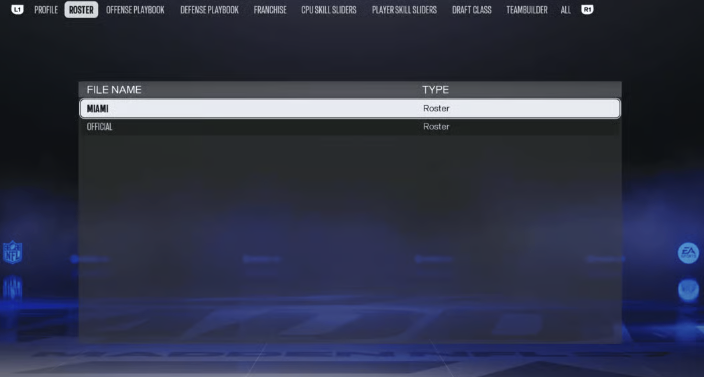
Return to the Creation Center and select Load/Delete Files. Open the Roster tab, select your saved roster, and choose Load File. When starting or continuing Franchise mode, select the appropriate Roster File option to import your custom setup.
If the roster doesn't immediately appear, repeating the Load File process can resolve the problem.
Key Takeaway: Always load your custom roster before entering Franchise if you want your edited players and transactions to appear.
What to Check After Every Update
Downloading the latest file is only the beginning. Spend a few minutes reviewing your team's lineup afterward.
Check every position, particularly after major periods of roster movement. Confirm newly added players, review ratings, and make sure traded or released players are no longer listed on their previous teams.
Key Takeaway: Don't blindly trust the automatically generated depth chart-manually review your lineup before starting important games.
Helpful Tips for Madden 27 Roster Management
·Check for roster updates regularly.
·Always select Update Rosters for official EA data.
·Don't confuse official updates with community-created roster files.
·Review your depth chart after every major update.
·Save custom rosters after making edits.
·Load custom files before launching Franchise.
·Keep backup versions of rosters you spend significant time editing.
·Recheck lineups after major trades and free-agent moves.
Final Thoughts: Keep Your Madden World Current
Updating Madden 27 rosters takes only a few steps, but it can make a significant difference to Franchise realism and overall gameplay. Official updates keep player ratings and NFL transactions current, while custom rosters give creative players complete control over their virtual league.
And if you're preparing your Ultimate Team alongside your updated Franchise roster, buy cheap Mut 27 coins at MMOEXP to level up your game and give your squad-building plans an additional boost.