







Players can access their personalized stats through the official Call of Duty website by signing into their Activision account, while another option allows players to request their Combat Record through Call of Duty's official X account. Your stats can reveal your K/D, W/L ratio, kills, wins, matches played, time played, favorite loadout, and weapon performance. For players looking to sharpen their skills, Buy CoD Modern Warfare 4 Bot Lobbies at MMOexp to practice movement, weapons, and strategies in a more controlled environment.

Method 1: Check Your MW4 Beta Stats on the Call of Duty Website
The easiest way to view your personalized Beta statistics is through the official Call of Duty website.
Follow These Steps
1. Log in to your Activision account.
2. Visit the official MW4 Beta stats page.
3. Sign in again if prompted.
4. Make sure the Activision account is linked to the platform account you used during the Modern Warfare 4 Beta.
5. Open your Combat Record and review your available statistics.
The account-linking step is particularly important. If you played the Beta on PlayStation, Xbox, or PC using a platform account connected to a different Activision account, your statistics may not appear under the account you're checking.
Key takeaway: Use the Activision account connected to the platform where you played the Beta to ensure your statistics are displayed correctly.

Method 2: Request Your Stats Through Call of Duty on X
Players can also request their personalized MW4 Beta Combat Record through the official Call of Duty account on X.
To request your statistics, create a post or reply to the designated official Call of Duty post and include:
·@CallofDuty
·Your Activision ID
·MW4 Beta Stats
Once your request is processed, you can receive your personalized Beta statistics.
Key takeaway: The X method provides an alternative if you prefer requesting your Combat Record through social media.
What Can You See in Your MW4 Beta Stats?
Your Beta statistics provide more than a simple kill count. They can give you a useful snapshot of your overall playstyle.
Combat Record
Your Combat Record can include:
·K/D ratio
·W/L ratio
·Total matches played
·Total wins
·Total kills
·Overall time played
These numbers can help you determine whether you were primarily an aggressive slayer, objective-focused player, or someone still learning the game's mechanics.
Key takeaway: Your Combat Record gives you the clearest overview of your overall Beta performance.
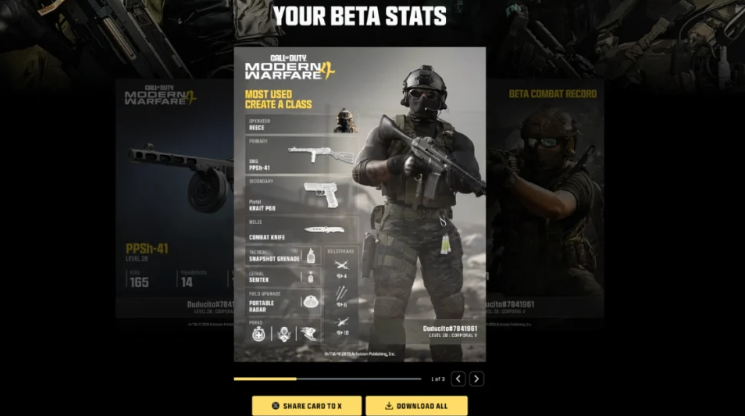
Most-Used Create-a-Class Setup
The stats page can also show your most frequently used Create-a-Class setup, including your primary and secondary weapons, tactical and lethal equipment, field upgrade, perks, and killstreaks.
This information is particularly useful for discovering which loadout you naturally relied on throughout the Beta.
Key takeaway: Your most-used class can reveal your preferred playstyle and equipment choices.
Most-Used Weapon Performance
Want to know whether your favorite weapon actually performed as well as you thought? Your statistics can provide information about your most-used Beta weapon, including:
·Total kills
·Headshots
·K/D ratio
·Accuracy
Comparing these numbers can help identify weapons that genuinely match your playstyle.
Key takeaway: Weapon-specific statistics can help you understand which guns deserve more attention.
Share Your MW4 Beta Results
After checking your statistics, you can share your Modern Warfare 4 Beta results directly on X or download the stats so you can post them on other social media platforms.
Sharing your Combat Record can be a fun way to compare performance with friends, especially when everyone claims they were the team's best player.
Don't Forget Your Beta Rewards
Your statistics are not the only reason to revisit your Beta experience. Players should also check the available MW4 Beta rewards, particularly if rewards or progression are connected to the full game's launch.
Reviewing your Beta performance alongside your rewards can give you a better picture of what you accomplished before release.
Helpful Tips for Checking Your Stats
·Use the correct Activision account: Account linking determines which statistics appear.
·Check your K/D and W/L together: A strong K/D does not always mean strong team performance.
·Review weapon accuracy: High kills combined with strong accuracy can identify your most effective weapons.
·Compare your loadouts: Your most-used class can reveal your preferred combat style.
·Save your stats: Download or screenshot your Combat Record if you want to compare it later.
·Don't obsess over one number: Beta performance is also about learning maps, weapons, movement, and mechanics.
Final Takeaway: Turn Your Stats Into Better Gameplay
Checking your Modern Warfare 4 Beta stats is more than a way to brag about your kill count. Your K/D, W/L ratio, accuracy, weapon statistics, and favorite loadouts can provide valuable clues about your strengths and weaknesses. Whether you use the official website or request your Combat Record through Call of Duty on X, getting your numbers is quick and useful. Players interested in practicing mechanics and experimenting with different approaches can also explore CoD Modern Warfare 4 Bot Lobbies, while Buy CoD Modern Warfare 4 Bot Lobbies at MMOexp can provide another option for players looking to level up their game and prepare for launch.