Weekend Drop -













The right controller settings can make a huge difference. A competitive setup should balance sensitivity, aim assist, deadzones, and movement controls so your inputs feel responsive without becoming difficult to control. For most players, a sensitivity around 1.6-1.7, customized deadzones, Target Aim Assist enabled, and streamlined movement settings provide an excellent starting point. If you want extra practice opportunities, Buy CoD Modern Warfare 4 Bot Lobbies at MMOexp to level up your game.
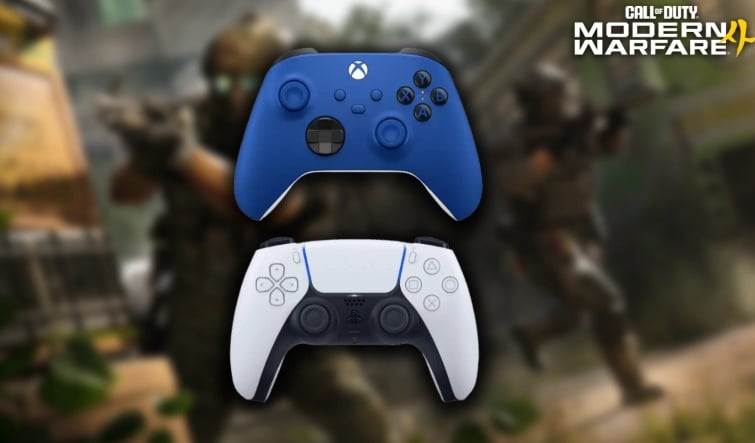
Best Controller Settings for MW4 Beta
Start with these settings as your baseline:
·Aiming Input Device: Controller
·Button Layout: Tactical
·Stick Layout: Default
·Horizontal Sensitivity: 1.6-1.7
·Vertical Sensitivity: 1.6-1.7
·Simplified Controls: Off
·Low Motor Strain: Off
·Bumper Ping: Off
·Swap L1/R1 with L2/R2: Off
·Controller Vibration: On
·Trigger Effect: Off
·Deadzones: Default; customize for drift
A sensitivity between 1.6 and 1.8 offers a good combination of fast turning and precise tracking. If you're constantly over-flicking, try lowering your sensitivity slightly. Conversely, increase it if enemies consistently move faster than your crosshair.
Key takeaway: Begin with 1.6-1.7 before making small adjustments based on your individual aim.
Fine-Tune Your Deadzones
Deadzone settings determine how much physical stick movement the game ignores. Lower values can make your controller feel much more responsive, but excessively low settings can expose stick drift.
If your controller is in good condition, experiment with lower minimum values. If your crosshair or character moves without touching the stick, gradually increase the relevant minimum until the drift disappears.
Lowering the Left Stick Max to roughly 65-75 can also help you reach maximum movement speed sooner, which is useful when strafing around corners. For the right stick, a 95-99 Max setting provides a comfortable range for precise aiming.
Key takeaway: Deadzones aren't universal-optimize them around your controller's condition rather than copying another player's numbers.
Optimize Your Aiming Settings
Use the following setup:
·Sensitivity Multiplier: 1.0
·Look Inversion: Standard
·Target Aim Assist: On
·Motion Sensor: Off
·Hip Sensitivity: 1.00
·ADS Sensitivity: 1.00
Keeping your general and ADS sensitivity at 1.00 creates a predictable aiming experience. If ADS feels overly sensitive, you can experiment with a 0.90 multiplier.
Target Aim Assist should remain enabled for controller players who want the standard competitive aiming experience.
For FOV, around 100-105 is a good starting point for players who want a competitive balance between peripheral vision and target visibility.
Key takeaway: Keep your ADS behavior consistent until you've developed reliable muscle memory.
Movement Settings for Competitive Play
Movement can be just as important as aim in MW4.
Recommended settings include:
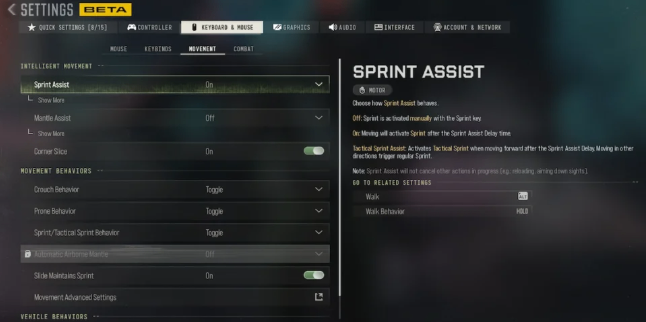
·Sprint Assist: Off
·Mantle Assist: Off
·Corner Slice: On
·Slide/Dive Behavior: Tap to Slide
·Automatic Airborne Mantle: On
·Slide Maintains Sprint: Off
·Parachute Behavior: Free Fall
Turning off excessive automation gives experienced players more direct control. Corner Slice can also help with peeking around obstacles while maintaining better awareness.
Key takeaway: Direct movement control gives you greater consistency during gunfights.
Combat Settings That Improve Control
For combat, consider:
·Aim Down Sight: Hold
·Weapon Mount: ADS + Melee
·Dedicated Melee: Hold Melee
·Armor Plates: Apply All
·C4: One by One
·Equipment: Hold
·Manual Fire: Press
·Scoreboard/Map/Stats: Toggle
Holding ADS gives you immediate control over when you're aiming, while a toggle-based scoreboard prevents you from having to hold a button unnecessarily.
Key takeaway: Combat settings should minimize accidental inputs and make important actions deliberate.
How to Test Your Settings
The best place to begin testing is the Firing Range.
Track a fixed point on a wall while strafing left and right. If your crosshair repeatedly overshoots, lower sensitivity by 0.05-0.10. If you're struggling to follow the target, increase it gradually.
Next, test your deadzones by slowly moving each stick. Look for unwanted movement and adjust the minimum value until the controls remain responsive without drifting.
After making changes, play several real matches before changing everything again. Constantly switching settings prevents your muscle memory from developing.
Key takeaway: Make small adjustments and give yourself time to adapt.
Final Tips
·Don't copy another player's sensitivity blindly.
·Adjust deadzones according to stick drift.
·Change sensitivity in small increments.
·Practice tracking while strafing.
·Give new settings several matches before judging them.
·Keep ADS behavior consistent while building muscle memory.
·Use the Firing Range whenever you make significant changes.
·Avoid changing multiple settings simultaneously.
Once your controller feels responsive and predictable, your mechanical improvement becomes much easier to measure. For players wanting additional ways to practice their aim, movement, and gunfighting skills, CoD Modern Warfare 4 Bot Lobbies can provide another practice-oriented option; Buy CoD Modern Warfare 4 Bot Lobbies at MMOexp to level up your game.