Black Ops 7 Season 6 is now live, bringing The Haunting to Multiplayer, Warzone, Zombies, and Endgame alongside new maps, modes, weapons, and seasonal content. With faster fights and a fresh competitive season, controller players have another reason to revisit their settings.
There is no single setup that works perfectly for every player, but the settings below provide a strong Season 6 starting point based on a current BO7 controller setup. The main focus is responsive movement, consistent aim, clear visibility, CoD Black Ops 7 Bot Lobbies and reducing unnecessary visual distractions.
Black Ops 7 Season 6 Controller Settings
The featured setup uses the default Button Layout and Stick Layout, with a 1.70 Horizontal and Vertical Sensitivity. That combination gives enough speed for close-range fights without making precision aiming unnecessarily difficult.
For players using a controller with rear paddles, movement can become much easier because jumping, sliding, or going prone does not require taking your thumb away from the right stick. A DualSense Edge or similar controller can be particularly useful for this type of setup, although the hardware is not required.
Controller Vibration is set to Off, while the stick deadzones are kept as low as practical. Lower deadzones can make the sticks respond sooner, but players should raise them if they experience noticeable stick drift.
The setup also uses 75 Left Stick Max and 100 Right Stick Max, with Button Deadzones at 0. These values are highly dependent on the condition of your controller, so they should be treated as starting points rather than universal requirements.
Best BO7 Sensitivity and Aim Settings
The biggest setting to test is the 1.70 sensitivity. Competitive BO7 players also commonly sit around the 1.7 range with Dynamic response curves, although professional settings vary from player to player. Current tracked CDL settings show several players using 1.7 sensitivity and Dynamic response curves.
For ADS, this setup uses a 0.65 Custom Sensitivity Per Zoom multiplier. Lowering the ADS multiplier slows your aim while aiming down sights, making it easier to stay on a target during sustained gunfights.
The recommended Aim Response Curve is Dynamic 1.0, while ADS Sensitivity Transition Timing is set to Instant. Target Aim Assist should remain enabled for controller players who want the game's intended aim-assist behavior.
It is worth remembering that sensitivity is personal. A setting that feels perfect at 1.70 may feel too slow or too fast for another player. Spend time in a private match or firing range before changing several values at once.
Black Ops 7 Movement Settings
Season 6 continues to reward fast, fluid movement, making movement settings just as important as sensitivity.
The setup keeps Tactical Sprint Assist enabled while avoiding unnecessary delay. Sprint Assist for Sideways and Backwards movement is also enabled to make movement around targets more fluid.
For Slide/Dive Behavior, the featured setup uses Slide Only. This is a personal preference rather than a universal competitive rule. Players who regularly use both mechanics may prefer Hybrid instead.
Other useful movement options include Automatic Airborne Mantles On, Sprint Restore On, and Slide Maintains Sprint On. These settings help reduce interruptions during movement chains.
Best BO7 FOV Settings for Season 6
The featured setup uses a 105 FOV, with ADS FOV set to Affected and Weapon FOV set to Wide.
A 105 FOV is also within the range recommended by current BO7 settings guides, although competitive players use a variety of values. One current guide recommends 105, while tracked professional players span a broader range around the high-90s to low-100s.
For a player who wants more peripheral vision without pushing target size too far, 105 is a reasonable starting point.
The setup also turns World Motion Blur and Weapon Motion Blur Off, along with Depth of Field Off. These changes make the image cleaner during fast movement and gunfights.
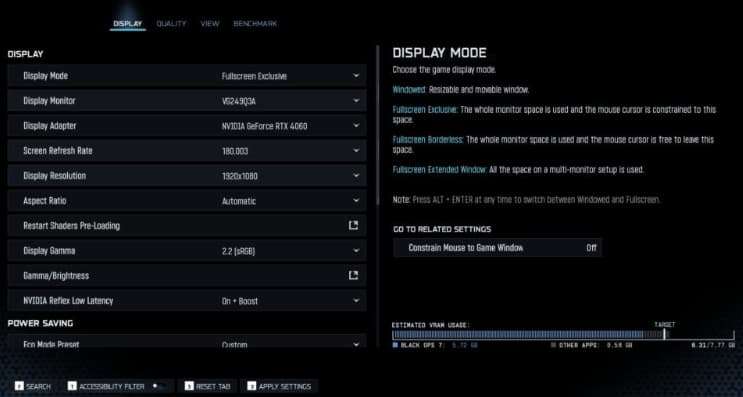
On PS5 Pro, the featured setup uses 120Hz and 1440p, with FidelityFX CAS at 75.
Black Ops 7 Audio Settings
Good audio remains important for tracking footsteps, enemy movement, UAV callouts, and other gameplay cues.
The setup keeps Master Volume at 50 while prioritizing Dialogue and Effects. Gameplay Music can remain active at a comfortable level, but competitive players may prefer to reduce anything that competes with important sound cues.
Most importantly, Mono Audio should be Off. With mono enabled, left and right audio channels are combined, making directional information harder to distinguish.
The setup also keeps the Classic Hit Marker Preset and turns Tinnitus Sound Reduction off.
HUD and Visibility Settings
For visibility, the setup uses Color Filter 2 with World and Interface Color Intensity at 100%. This produces a more vibrant presentation and can make HUD elements easier to distinguish.
The HUD Widget Scale is reduced to 0.15, allowing the player to keep important information visible without letting it dominate the screen. The Compass is turned off, while Server Latency, Packet Loss, and Network Alert Icons remain enabled.
Crosshair Lines stay enabled, with the Crosshair Dot enlarged and its opacity set to 100%.
The overall goal is simple: keep the center of the screen clean while making essential information such as the minimap, ammunition, streaks, and network status easy to check quickly.
Final Black Ops 7 Season 6 Settings
The most important values to test first are 1.70 sensitivity, 0.65 ADS sensitivity, Dynamic Aim Response Curve, 105 FOV, Affected ADS FOV, Wide Weapon FOV, and Motion Blur Off.
These settings should be treated as a baseline rather than a mandatory competitive formula. BO7 supports several viable controller setups, and current professional configurations show that even high-level players use different combinations of sensitivity, FOV, Black Ops 7 Bot Lobbies, deadzones, and button layouts.
For Season 6, start with the core values, play several matches, and change one setting at a time. That makes it much easier to determine whether a change is actually improving your aim and movement.