Weekend Drop -














Summary
College Football 27's Dynasty Mode can become much deeper when you have a PC and the right community tools. The My Dynasty tool acts as a central hub for managing and customizing a Dynasty save, giving you access to information and controls that are difficult to handle directly through the game.
From editing players and coaches to managing recruiting classes, tracking decades of history, and exporting draft classes to Madden 27, the tool can turn a standard Dynasty into a much more customizable experience. To further enhance your Dynasty, buy CUT 27 Coins and unlock premium features for more control over your program's development.
How to Set Up the My Dynasty Tool
Before using the tool, you need a CFB 27 Dynasty save file. The program works with your existing Dynasty rather than requiring you to start an entirely separate franchise.
Load an Existing Dynasty
Start by downloading and installing the My Dynasty program, then load a preexisting Dynasty save into the tool.
Once the save is loaded, the program can read your Dynasty information and present it through its main hub. You can then manage different aspects of your league without constantly navigating through multiple in-game menus.
The tool is designed around your Dynasty file, so keeping the same save allows its historical information and records to develop alongside your franchise.
Use the Main Dynasty Hub
The main hub is the easiest place to monitor your entire Dynasty. Instead of searching through separate menus, you can find important league information in one centralized interface.
Monitor League Information
The hub can display information such as:
Top 25 rankings
League news
Top recruits
Recruiting commitments
Team standings
Rivalries
Season goals
Heisman races
Your recruiting board
NIL budget
Depth chart information
This makes it easier to understand what is happening around the league while managing your own program.
You can also select individual teams to examine their current situation and follow how programs develop over multiple seasons.
Manage Players and Coaches
One of the most powerful features is the ability to inspect and edit individual players and coaches.
Edit Player Information
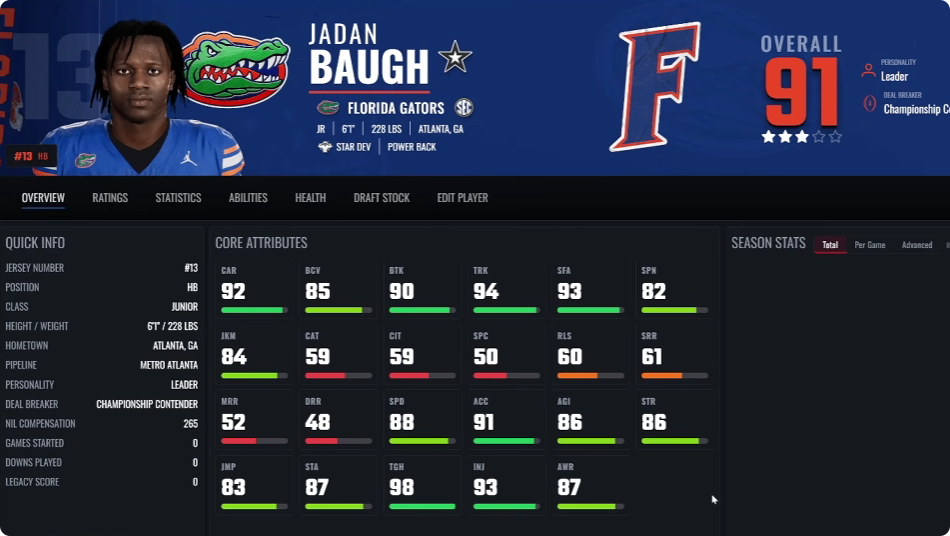
Select a player to view detailed information including their overall rating, personality, deal breaker, development trait, abilities, ratings, and skill caps.
You can also edit many parts of the player directly through the tool, including:
Name
Jersey number
Height and weight
School
Development trait
Ratings
Abilities
Appearance
Equipment
Health
Wear and tear
Ratings can be adjusted through simple controls, making it possible to correct information, create custom scenarios, or build specialized Dynasty challenges.
Customize Coaches
Coaches can also be modified. Depending on what you want to change, you can adjust a coach's playbook and coaching philosophy while keeping track of program records and other information.
This gives you more control over how teams evolve throughout a long Dynasty.
Improve Recruiting Management
Recruiting is another area where the My Dynasty tool can significantly expand your options.
Import Recruiting Classes
The tool can work with external recruiting-class files. After downloading a recruiting class spreadsheet, you can import it into the tool and load the information into your Dynasty.
You can then review prospects, commitments, interests, and other recruiting information from the centralized interface.
This is particularly useful if you prefer realistic recruiting classes rather than relying entirely on the default generated prospects.
Customize Prospects
The recruiting editor provides additional control over individual prospects. Depending on your setup, you can adjust factors such as a recruit's interest and other recruiting information.
This can help create custom recruiting scenarios or modify a class to better match the type of Dynasty you want to run.
Control Your Season
The tool isn't limited to the preseason. It can also help manage your Dynasty throughout the regular season and postseason.
Use Simulation Guardrails
Simulation guardrails can be used to make simulated results more realistic by limiting certain extreme outcomes, including excessive FCS upsets.
You can also access tools for modifying polls and championship information, giving you additional control over how the national picture develops.
Manage Bowl and Playoff Results
When the season reaches bowl and playoff games, the available editors provide additional control over postseason structures and results.
This can be useful for rebuilds, alternate-history Dynasties, or custom scenarios where you want greater control over the league.
Track Dynasty History
Long-term history is one of the most useful features for players who run Dynasties for many seasons.
Build an Almanac
The almanac allows you to look back through your league's history, including national championships, conference results, and other historical achievements.
Instead of treating every season as an isolated experience, you can build a record of your Dynasty across decades.
The tool can preserve historical information as your Dynasty progresses, allowing you to revisit previous seasons and compare different eras.
Record Instant Classics
The Instant Classics feature tracks memorable games from your Dynasty, including dramatic finishes, comebacks, overtime battles, and other notable matchups.
This gives long-running Dynasties a stronger sense of continuity and makes important games easier to remember.
Customize Teams and Programs
The tool also provides options for modifying programs beyond individual players.
Manage Team Information
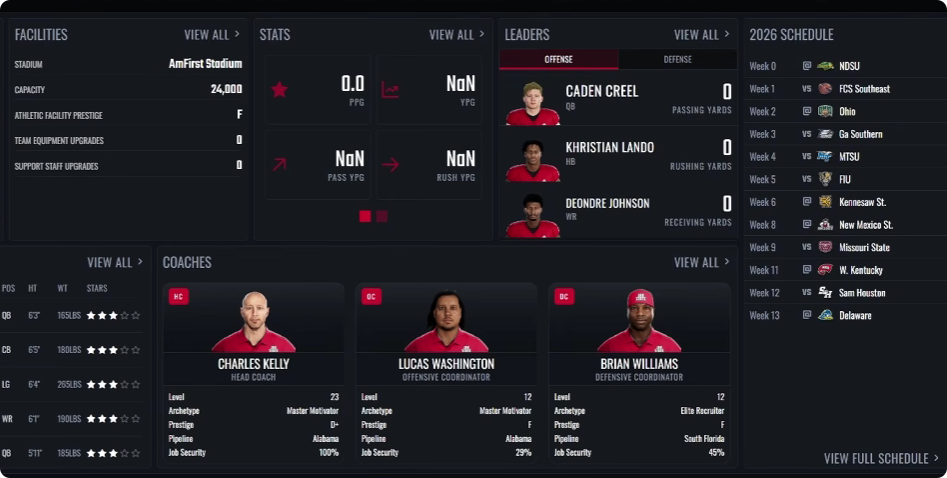
You can inspect program information, facilities, records, rivals, and other details from the same interface.
Team apparel can also be customized, allowing players to create more personalized programs. While this does not completely replace a dedicated Team Builder system, it provides additional flexibility for custom Dynasty scenarios.
Manage the Coaching Carousel
Coaching changes become more interesting with the former-player coach system.
Add Former Players to the Hiring Pool
The tool can replace generic coaches in the hiring pool with real graduating seniors from your Dynasty before the coaching carousel takes place.
This helps create a more connected Dynasty world where players who previously competed in your league can eventually return as coaches.
Connect CFB 27 With Madden 27
One of the most ambitious features is the ability to connect your college Dynasty with a Madden franchise.
Export Your Draft Class
After completing a season, you can use the draft-class tools to export players from your CFB 27 Dynasty for use with Madden 27.
Combined with compatible franchise tools, this creates a broader football ecosystem: develop players in college, track their careers, and then continue their stories at the professional level.
For players who enjoy long-running rebuilds, this can make multiple football games feel like parts of the same universe.
Keep Your Dynasty Realistic
The My Dynasty tool provides extensive control, but that doesn't mean every available option should be used.
Decide Which Features to Use
If you want a realistic Dynasty, consider using tools primarily for correcting problems, improving recruiting realism, managing unusual simulation results, and preserving historical information.
For custom rebuilds or alternate universes, you can take advantage of the editing features much more aggressively.
The goal is to decide what level of control makes your Dynasty more enjoyable without removing the challenge that makes Dynasty Mode fun.
Final Thoughts
The My Dynasty tool effectively turns a CFB 27 Dynasty save into a much more manageable and customizable football universe.
Its centralized hub makes league information easier to access, while player and coach editors provide detailed control over individual programs. Recruiting imports, simulation guardrails, historical tracking, coaching-carousel customization, and draft-class exports add even more possibilities.
If you play CFB 27 on PC and want to run a Dynasty that lasts for decades, learning how to use these tools can give you far more control over the experience. Just remember that community-created tools can change alongside the game, so always verify that the version you are using remains compatible with your current Dynasty save. To enhance your Dynasty further, CUT 27 Coins unlocks premium features that give you even deeper customization.