Weekend Drop -















One WoW Forever beta player reported 400,854 jumps. Another listed 17,238 crafted items, while a third logged 433 hours of playtime. Blizzard's Beta Timewalking recap has given testers plenty to compare, including how often they pressed the spacebar between quests.
You can check your own WoW Forever Beta Stats by signing in to Blizzard's Beta Timewalking page with the Battle.net account you used during testing.
The recap includes percentile comparisons and a share card with up to four statistics. Even if you missed the beta, the results players are posting offer a look at how differently people spent their time before testing ended on October 23, 2026.
Where to Find Your Beta Stats
Access the Beta Timewalking Page
Start with Blizzard's official World of Warcraft: Forever Beta Timewalking page.
Open the Beta Timewalking page.
Select Log in and Timewalk.
Sign in with the Battle.net account you used for the regular beta.
Follow the on-screen prompts to reach your personalized results.
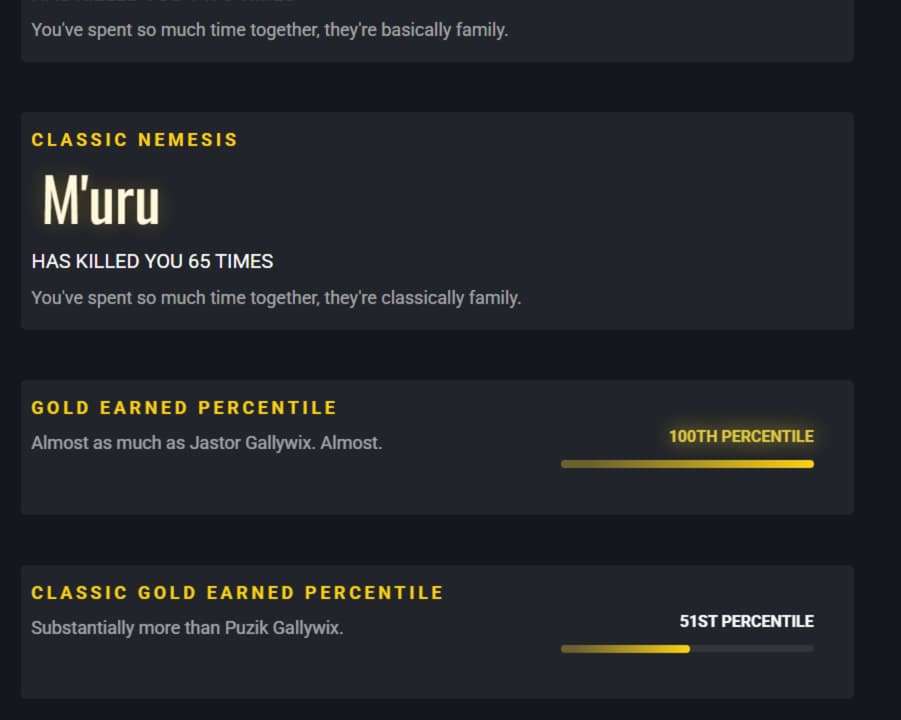
Scroll through the statistics and their percentile labels.
The page also asks for consent to use your data to generate the statistics. If you decline, it cannot generate your personal recap.
You do not need to reopen the closed beta client. If you use multiple Battle.net accounts, check the account you selected before concluding that your records are missing.
The website is separate from the in-game Statistics pane. That pane tracks character records inside the client; Beta Timewalking is the browser-based recap with the share-card builder. Searching for instructions to open the character window will take you to the wrong feature for this task.
Players' Strangest Beta Stats
Jump Counts Draw Comparisons
The player who reported 400,854 jumps gave the spacebar plenty of work. For comparison, another commenter listed 2,706 jumps at the 40th percentile, while a third reported 302,929 jumps with a 100th-percentile label.
Anyone who has hopped along a road while waiting for friends will recognize the habit. Seeing it reach six figures raises a different question: how much of that player's beta was spent with both feet off the ground?
The comparisons below are player-reported, rather than independently verified records or a representative sample of the beta.
Fishing, Crafting and Playtime
The crafting numbers are just as striking. The WoW Forever player who reported 17,238 crafted items also said they earned plenty of WoW Forever Gold through the Auction House during the beta. If you spent testing hopping between quests, someone else was apparently enjoying the business side of Azeroth.
Another commenter listed 433 hours played, 3,211 completed quests and 11,260 crafted items. That works out to more than 18 full days of logged time, including any time spent idle.
If you have ever filled your bags while leveling a profession, those crafting totals are easy to appreciate. Did your beta end with a full quest log, or with another trip between the mailbox and the Auction House?
Fishing produced its own comparison. One player remarked that roughly 1,000 fish showed the 100th percentile despite their own catch being nearly double. Even fishing gave players something to compare after the servers closed.
Camping Companions Tell Different Stories
One player reported 11 Camping Companions at the 48th percentile. Another listed 286 at the 99th percentile. Put those cards side by side in a guild chat and the conversation practically starts itself: How many adventurers did you actually share a campfire with?
That gap gives WoW veterans something to discuss about their time around other players. It cannot settle whether Forever's social systems worked well, but it does make Camping Companions a more interesting card to compare than its plain label suggests.
What Beta Stats Reveal to New WoW Forever Players
If you're new to WoW Forever, the crafting totals and Auction House earnings show why collecting WoW Forever Items, developing professions, and trading can become projects of their own. Camping Companions offers a glimpse of the social side: sharing a campfire gives adventurers a chance to meet while out in the world.
Hours Played, Quests Completed and Jumps capture different parts of those sessions, from questing progress to the habit of hopping along a road. They leave room to imagine the time between fights, too. These unusually active testers do not set a required pace for newcomers. Your first character does not need a 433-hour commitment.
What Your Beta Stats Show
Playtime, Exploration and Profession Records
The WoW Forever recap covers familiar milestones alongside smaller habits. Displayed stats include:
Category | Stat Examples | What to Look For |
Playtime | Hours Played, Characters Played | Your time commitment and character activity |
Favorites | Most Played Class, Most Played Zone | Where you spent most of your beta time |
Progression | Quests Completed, Levels Gained | How much leveling and questing you did |
Combat | NPC Nemesis | The enemy responsible for your most deaths |
Exploration | Jumps, Yards Traveled | Movement habits and distance covered |
Social | Camping Companions, Social Countries | The recap's camping and social records |
Professions | Gathering Actions, Items Crafted | Your gathering and production activity |
Looting | Chests Looted | How many treasure chests you looted |
The More Unusual Records
Other cards count fish caught, clams opened, boars killed and even okra looted. Then there is NPC Nemesis: after all those dungeon runs, the enemy that killed you most might turn out to be an ordinary quest mob. That is a card worth comparing with the people who leveled alongside you.
Beta Stats Percentiles Explained
A percentile tells you roughly where a result sits within the comparison group for that statistic. A jump count at the 99th percentile is near the top of that distribution. It does not mean you finished in 99th place.
Similarly, the 40th percentile puts a result around the lower-middle part of the distribution, approximately above 40% of the comparison group under the usual interpretation. It does not mean the top 40%.
For WoW Forever, treat the displayed percentile as a broad comparison. The exact handling of ties, rounding and comparison-group eligibility is not explained, so a 100th-percentile label does not establish a single winner.
Each activity has its own distribution. You could rank highly for fishing and much lower for jumping because different numbers of players spent time on those activities. Comparing those labels does not tell you which activity required more effort.
Create Your Stats Share Card
Customize and Save the Image
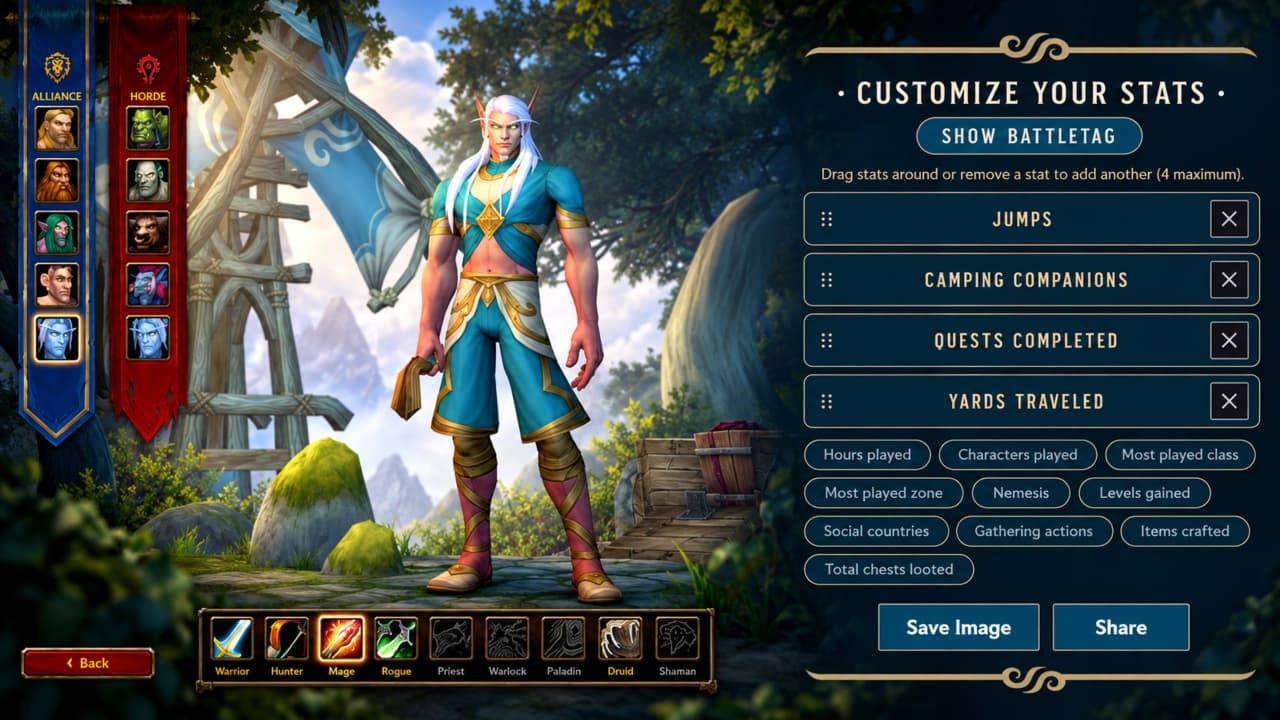
Once you have reviewed your WoW Forever results, scroll to the Customize Your Stats area at the bottom of the Beta Timewalking page.
Select up to four statistics for the card.
Arrange the selected entries in your preferred order.
Use Show BattleTag to decide whether your tag appears.
Review the finished selection and its labels.
Choose Save Image or Share.
Check the BattleTag setting before posting the image publicly. Hiding it lets you share the numbers without displaying that account identifier on the card. Save a local copy if you want to keep the recap alongside your beta screenshots.
Choose Stats with a Story
For a leveling-focused card, start with Hours Played and Quests Completed, then add a record that explains how you spent the rest of your sessions. An exploration card could pair Yards Traveled with Most Played Zone and Jumps.
Camping Companions and Social Countries suit a card about the people you encountered. For something funnier, put NPC Nemesis beside an unusually high clam or boar count. These are suggested combinations; choose the entries available in your own results that you would enjoy explaining to friends.
Missing Stats and Data Limits
Stress Test Activity Is Excluded
The Beta Timewalking explanation, as reported by coverage of the page, excludes Stress Test activity. If your remembered playtime includes that separate test, it will not all belong in this recap.
If your stats are missing, make sure you're signed into the correct Battle.net account and that you participated in the regular beta rather than only the Stress Test.
Beta Progress Does Not Carry Over
World of Warcraft: Forever beta character progress will not transfer to the live game. The stats card preserves a record of testing, but WoW Forever Gold, equipment, and profession progress earned during the beta will not carry over to launch.
What Happens after the Beta
Blizzard's next announced milestones are character creation on October 27 and the full WoW Forever launch on November 4, 2026. Early name reservation has its own access requirements, so check eligibility before planning around that opening.
Date | Milestone |
October 23, 2026 | Beta ended |
October 27, 2026 | Early character creation and name reservation begin |
November 4, 2026 | Official launch |
Save your finished card locally if you want to keep it with your beta screenshots or compare it with guildmates before launch.