Summary

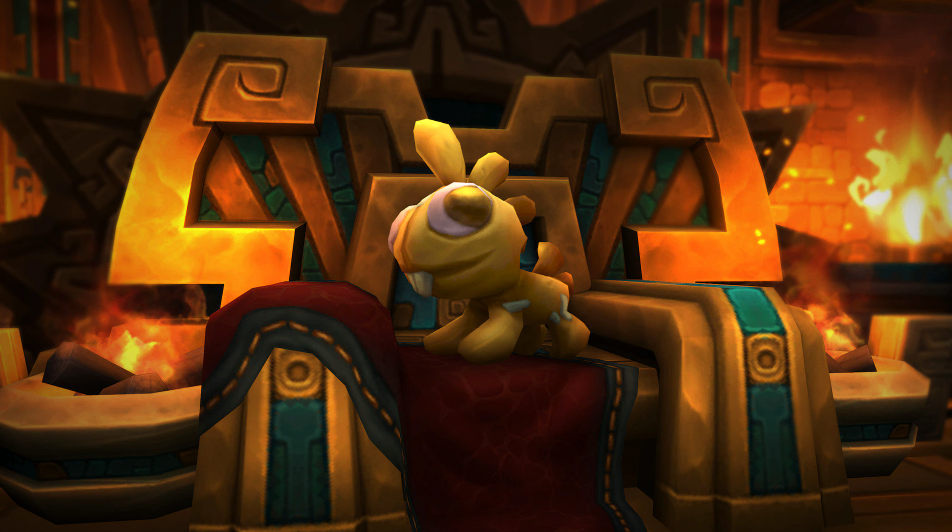
World of Warcraft: Forever launches on November 5 (Taiwan time), and ahead of that, the Twitch Drops campaign is already live. Watch 4 hours of any World of Warcraft stream and you'll receive the Golden Murloc Plush housing decor for free. If you're already planning your Forever journey and want a head start on the economy, you can also look into ways to buy WoW Forever Gold before launch. Here's the complete guide, with a short intro to Forever at the end.
Summary World of Warcraft: Forever launches on November 5 (Taiwan time), and ahead of that, the Twitch Drops campaign is already live. Watch 4 hours of any World of Warcraft stream and you'll receive the Golden Murloc Plush housing decor for free. If you're already planning your Forever journey and want a head start on the economy, you can also look into ways to buy WoW Forever Gold before launch. Here's the complete guide, with a short intro to Forever at the end. Event Dates Start: October 14, 1:00 AM (Taiwan time) End: November 4, 2:00 AM (Taiwan time) Reward Watch any World of Warcraft stream with Twitch Drops enabled for 4 hours to earn the Golden Murloc Plush housing decor item. Players who already earned the item through Twitch Drops can buy more from the following NPCs: Silvermoon City: Denia Silvertongue   Stormwind City: Toulan (near the Trading Post) Orgrimmar: Gaby (near the Trading Post) How to Participate Step 1: Link Your Accounts Go to Battle.net  and log into your Battle.net account. Click the Twitch option and follow the prompts to link your accounts. If you've recently changed your Twitch or Battle.net account information, you must re-link. After re-linking, you must wait 7 days before linking a new Twitch account. Step 2: Confirm Your Region After claiming the reward on Twitch, make sure the Battle.net region you're logged into is the one you want the reward on. Once you log in, the item cannot be claimed from another region. Step 3: Watch Streams Watch any channel in the World of Warcraft category on Twitch that has Drops enabled, accumulating 4 hours total. You can switch channels mid-way without losing progress, but watching multiple streams at once won't speed things up. Step 4: Claim the Reward You must manually claim the reward on the channel you're watching, or from your Twitch Drops inventory page. After claiming, it may take up to 24 hours for the reward to appear in-game. FAQ Q: What devices can I use? A: PC/Mac web browsers, or the Android/iOS Twitch app. Console, smart TV, and other TV apps do not support Twitch Drops. Q: Do rewards expire? A: If your Battle.net account isn't linked, earned Twitch Drops will disappear after 7 days. Q: Which regions are eligible? A: North America, Latin America, Europe, the Middle East, Africa, Japan, Taiwan, Southeast Asia, Australia, and New Zealand. Important Notes This Drop cannot be used in World of Warcraft Classic Requires an active World of Warcraft subscription or game time Housing decor items can only be used and placed with the Housing feature, which requires World of Warcraft: The Dark Heart  A Quick Intro to World of Warcraft: Forever Forever is a brand-new version launching November 5, sitting alongside Modern WoW and Classic but taking a completely different path: the level cap stays at 60 permanently and never advances to later expansions. Instead, it expands through new storylines and ongoing updates. It also introduces a new race, the Skyborne, and opens up class combos that weren't possible in original Classic, such as Orc Mage, Undead Paladin, and Human Hunter. It also adds a "Camp" system that lets players build portable social and functional hubs in the open world. Access to Forever is included with your World of Warcraft subscription or game time—no separate purchase required. Recommendation If you haven't linked your Battle.net and Twitch accounts yet, do it now. The event runs for three weeks, but re-linking takes 7 days, so the sooner you handle it, the better. While watching, make sure the channel has Drops enabled, and claim your reward as soon as you hit 4 hours to avoid expiration.

Event Dates

Start: October 14, 1:00 AM (Taiwan time)

End: November 4, 2:00 AM (Taiwan time)


Reward

Watch any World of Warcraft stream with Twitch Drops enabled for 4 hours to earn the Golden Murloc Plush housing decor item.

Players who already earned the item through Twitch Drops can buy more from the following NPCs:

Silvermoon City: Denia Silvertongue

Stormwind City: Toulan (near the Trading Post)

Orgrimmar: Gaby (near the Trading Post)


How to Participate

Step 1: Link Your Accounts

Go to Battle.net  and log into your Battle.net account. Click the Twitch option and follow the prompts to link your accounts. If you've recently changed your Twitch or Battle.net account information, you must re-link. After re-linking, you must wait 7 days before linking a new Twitch account.

Step 2: Confirm Your Region

After claiming the reward on Twitch, make sure the Battle.net region you're logged into is the one you want the reward on. Once you log in, the item cannot be claimed from another region.

Step 3: Watch Streams

Watch any channel in the World of Warcraft category on Twitch that has Drops enabled, accumulating 4 hours total. You can switch channels mid-way without losing progress, but watching multiple streams at once won't speed things up.

Step 4: Claim the Reward

You must manually claim the reward on the channel you're watching, or from your Twitch Drops inventory page. After claiming, it may take up to 24 hours for the reward to appear in-game.

WoW Forever Twitch Drops Guide: How to Get the Free Golden Murloc Plush

FAQ

Q: What devices can I use?
A: PC/Mac web browsers, or the Android/iOS Twitch app. Console, smart TV, and other TV apps do not support Twitch Drops.

Q: Do rewards expire?
A: If your Battle.net account isn't linked, earned Twitch Drops will disappear after 7 days.

Q: Which regions are eligible?
A: North America, Latin America, Europe, the Middle East, Africa, Japan, Taiwan, Southeast Asia, Australia, and New Zealand.


Important Notes

This Drop cannot be used in World of Warcraft Classic

Requires an active World of Warcraft subscription or game time

Housing decor items can only be used and placed with the Housing feature, which requires World of Warcraft: The Dark Heart


A Quick Intro to World of Warcraft: Forever

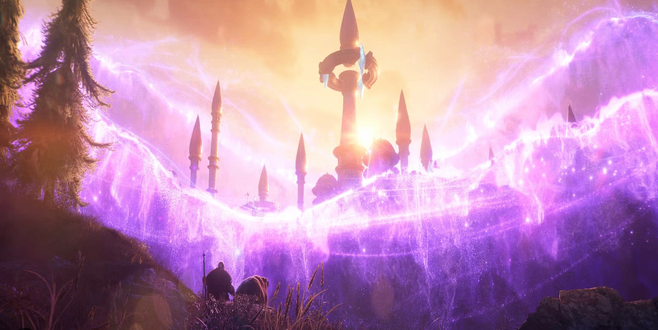
Forever is a brand-new version launching November 5, sitting alongside Modern WoW and Classic but taking a completely different path: the level cap stays at 60 permanently and never advances to later expansions. Instead, it expands through new storylines and ongoing updates.

It also introduces a new race, the Skyborne, and opens up class combos that weren't possible in original Classic, such as Orc Mage, Undead Paladin, and Human Hunter. It also adds a "Camp" system that lets players build portable social and functional hubs in the open world.

Access to Forever is included with your World of Warcraft subscription or game time—no separate purchase required.
WoW Forever Twitch Drops Guide: How to Get the Free Golden Murloc Plush

Recommendation

If you haven't linked your Battle.net and Twitch accounts yet, do it now. The event runs for three weeks, but re-linking takes 7 days, so the sooner you handle it, the better. While watching, make sure the channel has Drops enabled, and claim your reward as soon as you hit 4 hours to avoid expiration.