Weekend Drop -














Several early Call of Duty: Modern Warfare 4 DMZ mission blockers have received fixes, and your next level reward could save you a backpack craft. Level 6 awards two Rigid Synthetics; Level 8's Restock Kit includes Medium Backpacks. Check those rewards before spending ingredients, especially if you are close to either milestone.
With Call of Duty: Modern Warfare 4 Multiplayer opening October 23 after DMZ's October 20 Early Access, your general player levels carry across. Multiplayer XP cannot raise your separate DMZ Level.
Keep deploying for a specific FOB or crafting goal, or take your unlocked attachments into Multiplayer and retest the launch SMGs and Perks against your beta habits. The fixes, reward choices, and weapon checks below show where to start.
DMZ Fixes and Remaining Issues
Important Early Access Fixes
If an early bug stopped your MW4 DMZ session, check the specific fix before repeating the task. Infinity Ward's October 20-21 changes address the following problems:
Problem | Reported Fix | What to Do Next |
Breaking New Ground door breach crash | Addressed October 20 | Retry the blocked mission after updating. |
First After-Action Report showing 0 XP | Incorrect display addressed October 20 | Check your progression instead of assuming the run earned nothing. |
Commander kill credit reaching only the final attacker | Squad XP and King Slayer Calling Card progress issue addressed October 20 | Resume squad Commander objectives; check the relevant challenge afterward. |
Error opening the Dog Tag Case | Addressed October 21 | Try accessing the case again. |
Toxic Intercept failing after Defend the Bomb | Incorrect failure addressed October 21 | Retry the operation if that exact objective blocked you. |
The Commander change specifically concerns XP and King Slayer progress. It does not establish that every Commander-related Order now credits every teammate under every condition. Read your own objective before committing equipment to another attempt.
Likewise, the 0 XP fix concerns the report display. It does not promise compensation or a particular XP total. If your counter still looks wrong, record the before-and-after values and the task you completed so a report identifies the actual mismatch.
Operator Prestige and Launch Access
Activision's known-issues page, checked October 23 and still dated October 21, lists an Operator Prestige blocker. Its workaround calls for Rare weapons with exactly three attachment slots that have never had four or more attachments. Removing attachments from a previously expanded weapon does not meet that description.
If your eligible Operator cannot Prestige, try those weapons before replacing the rest of the setup. Prestige sacrifices equipment, cash, and current Traits, so remove unrelated valuables before confirming. If the workaround fails, preserve your resources and report the blocker rather than repeatedly rebuilding.
For Xbox on PC players missing the Campaign or DMZ launch button, check that Modern Warfare 4 Content Pack 1 is installed. Activision also recommends checking whether your Microsoft Store account has exceeded its ten-device limit. These are troubleshooting checks, not a guaranteed fix.
Gear Up appeared in an earlier issue list but is absent from the updated October 21 page. The patch notes also report a fix for the starting-equipment soft lock. If you still encounter it, report the current behavior instead of treating the old listing as proof that it remains unresolved.
DMZ Progression Priorities
Target the Next Useful Unlock
Use your MW4 DMZ Level to choose the next useful facility or recipe. Your general Multiplayer rank is a separate counter, even when both increase during the same session.
DMZ Level | Unlock | Practical Priority |
1 | 3D Printer and basic recipes | Check the crafting options available in your FOB. |
2 | 2-Plate Armor Vest and Medium Backpack recipes | Address protection or carrying capacity, depending on what stops your runs. |
5 | Vendor | Check available equipment against what you already own. |
6 | Two Rigid Synthetics and a Basic Armor Kit | Count rewards before farming more ingredients or crafting replacement armor. |
8 | Restock Kit | Check its Medium Backpacks before funding another backpack craft. |
10 | Gunsmith | Consider DMZ Cash spending on a weapon you intend to keep using. |
20 | Dog Tag Case | Manage collected Dog Tags; this is less urgent than solving a survival bottleneck. |
The newer launch progression table places the printer at Level 1; an older FOB guide lists Level 2. Check the station in your current build before planning a deployment solely to unlock it. The Level 2 armor and backpack recipes remain the useful early equipment checkpoint.
Choose between them by identifying why your last runs ended. If useful loot keeps exceeding your available space, prioritize the backpack. If you can carry everything needed but cannot survive the required fights, consider armor first. These are conditional equipment choices, not a tested universal crafting order.
Choose by Level and Reserves
Your Current Position | Next Useful Action | When to Change the Plan |
Level 2, short on space or protection | Fund the backpack or vest that solves the immediate shortage. | Equip a suitable looted or rewarded item instead if one is already available. |
Approaching Level 6, holding three Rigid Synthetics | Count the two awarded at Level 6 toward the backpack's five-ingredient requirement. | Craft only when the 50 Synthetics requirement is also met and you still need the bag. |
Near Level 8, missing several ingredients | Pursue manageable Orders or operations toward the Restock Kit. | After unlocking it, open it at Survival Kits and check its Medium Backpacks before crafting. |
Level 8, adequately equipped, considering Multiplayer | Continue to Level 10 if you have a Weapon Manual for a gun you want to build or attachments you want to fit. | If you have no immediate Gunsmith project, try Multiplayer without finishing those two levels first. |
The Level 6 Basic Armor Kit contains 2-Plate Carriers and an Armor Box; the Level 8 Restock Kit includes Medium Backpacks, a Munitions Box, and an Armor Box. These rewards can replace a planned craft. They do not guarantee that earning the next level will be faster than gathering your missing ingredients.
Plan Your Next Deployment
At the FOB, read your current Orders and pick one objective you can reasonably pursue with your available equipment. Check whether completion requires extraction. Then select a craft, inspect rewards already available to you, and track only the remaining materials.
Collect those items alongside a compatible Order or Dynamic Operation. Start looking for an exit once you secure the required item, finish the intended task, or lose the supplies needed to continue safely. Back at the FOB, check the Order counter and crafting inventory before paying for replacements.
For a concrete Level 2 target, the Medium Backpack recipe requires 50 Synthetics and five Rigid Synthetics. Suppose you have 40 Synthetics and three Rigid Synthetics: you need ten more of the basic resource and two intact ingredients. Track Rigid Synthetics, check the printer's ingredient-location hint, and collect the remaining amount. That hint identifies a general search area, not a guaranteed spawn.
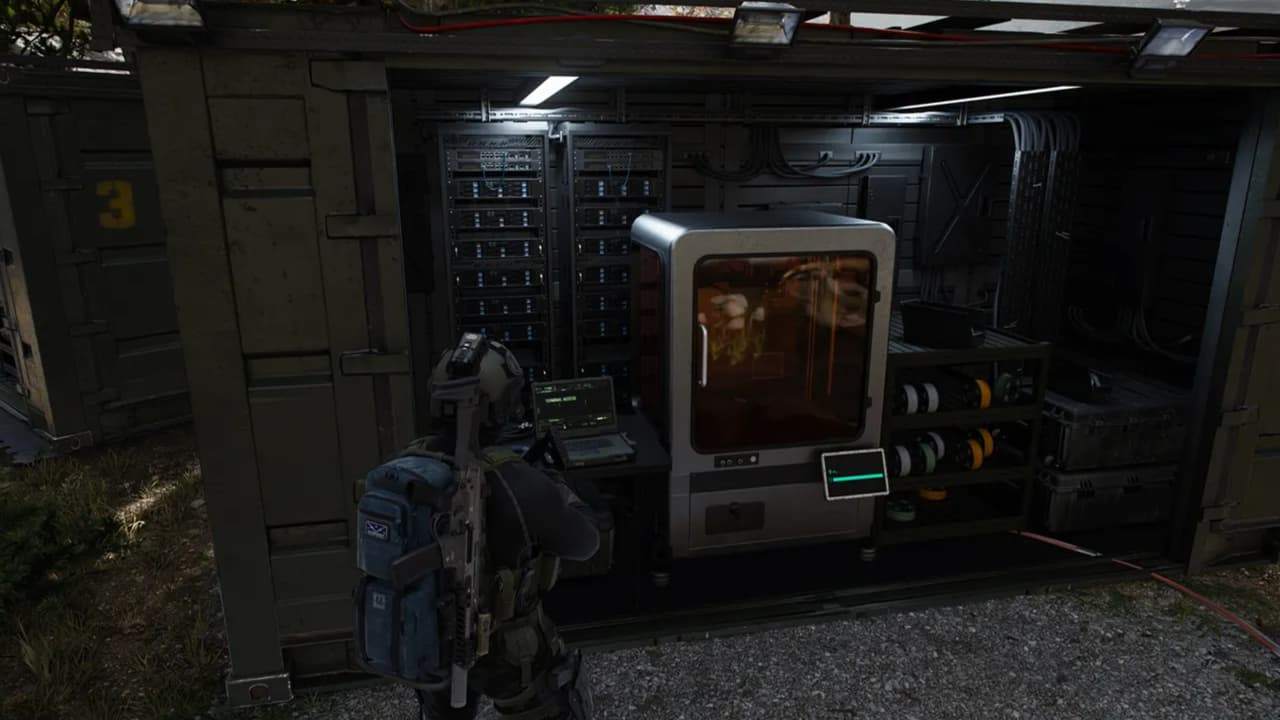
After extracting, return to the printer, confirm the recipe requirements are met, and print the backpack to your Operator or equip it from the Stash. Its Secure Slots protect their contents if a later extraction fails; check what you place in them.
If protection is the immediate problem instead, the 2-Plate Armor Vest requires 50 Synthetics and five Reactive Metals. Both recipes need Synthetics, so fund your chosen item before splitting that resource between them.
Spend around Your Current Bottleneck
For the backpack example, keep Rigid Synthetics; for the vest, reserve Reactive Metals. Avoid selling a missing ingredient simply because its cash value looks useful. Check your selected recipe and available FOB upgrades first.
Valuables can be sold for DMZ Cash, but some also serve as FOB upgrade inputs. Treat an unneeded valuable as a sale candidate only after checking those requirements. There is no blanket early-game “sell every valuable” rule. Keep enough ammunition and healing for extraction before making space for extra loot.
If you have a suitable backpack and armor, inspect the next available FOB upgrade before making duplicates. If you lack cash for that upgrade, pursue cash; if you have cash but lack a tracked component, keep that ingredient. At Level 10, a Weapon Manual determines which weapon you can build: unlocking Gunsmith alone does not supply every weapon construction option.
DMZ and Multiplayer Shared Progression
Know Which Counter You Are Advancing
DMZ XP contributes to the shared Level 1-55 player progression in Modern Warfare 4. Multiplayer XP does not contribute to the separate Level 1-70 DMZ track, so even players working on weapon levels through CoD Modern Warfare 4 Bot Lobbies must return to DMZ for those unlocks.
Continue DMZ for FOB and recipe unlocks; either mode works for general player progression. Neither rule establishes which mode earns XP faster for you.
Progression | DMZ | Multiplayer |
Shared player Levels 1-55 | Advances the track | Advances the track |
Dedicated DMZ Levels 1-70 | Earned here | Does not advance this track |
FOB level-gated stations and recipes | Unlocked through DMZ progression | General rank does not replace DMZ requirements |
Compatible shared attachments | Earned unlocks apply to compatible weapons | Compatible earned unlocks remain available |
Special Camos | Complete the mode's corresponding challenge | Unlocked Special Camos are usable across modes |
DMZ Operator Traits and Prestige | Separate Operator development | Multiplayer rank does not substitute for it |
Read the active challenge after switching modes. Special Camo requirements adapt to the mode, and completing one unlocks that camo across modes. This does not mean every Multiplayer and DMZ Mastery requirement is interchangeable. Check the specific weapon and challenge before committing a session to it.
Shared attachments also depend on compatibility. An attachment you earned for one weapon does not fit every gun. Inspect your intended Multiplayer weapon before starting a new unlock grind, especially if you spent Early Access using a different weapon family.
Choose a Mode by Your Goal
Stay in DMZ for FOB stations, printer recipes, and Operator development. Choose either mode for general player levels; no verified XP-per-hour comparison establishes a universal winner.
Choose Multiplayer for repeated PvP practice and launch-map knowledge; for weapon XP and camo goals, CoD MW4 Bot Lobbies are another option, provided the selected session supports the challenge you need.
For camo goals, select the specific challenge and compare its mode requirements before committing a session. For weapon construction, count your extracted Manuals and cash before deciding that another DMZ level will give you something you can use immediately.
Multiplayer Changes Since the Beta
Weapons and Time to Kill
Modern Warfare 4's launch tuning follows Beta Weekend 2's general combat pace, with stronger SMGs at close to medium range and adjustments to powerful one-hit weapons. Test your preferred weapon again before copying the assumptions behind your beta loadout.
In his launch breakdown, TheXclusiveAce reports average close-range SMG TTK falling from 277ms to 246ms, and long-range averages from 471ms to 393ms. Those are creator-reported comparisons with damage-zone conditions, not official guarantees for every encounter. His assault-rifle average changed by only about 10ms.
Movement and Perk Choices
Tactical Sprint still requires Blood Rush in Perk 2. With it equipped, the default sprint input triggers Tactical Sprint; adjust Movement Advanced Settings if you want separate control.
Battle Hardened counters tactical effects more effectively, while Resupply delivers its first equipment recharge sooner. Choose around what interrupts your matches: repeated tactical disruption gives Battle Hardened a clear use, while an equipment-focused setup has a reason to consider Resupply.
Ace's early impressions describe slightly less responsive slide canceling and conspicuous footsteps without Ninja. Treat those as initial observations. Spawn and movement changes still need broader play before supporting confident claims about consistency or a mandatory Perk setup.
Multiplayer Launch Checklist for Returning COD Players
Retest Your Beta Weapons
Keep your familiar MW4 AR as a baseline, even if you use MW4 Bot Lobbies for weapon-level objectives; performance in those sessions still needs checking against real players.
Add the PPSh-41 or X-58 Nyx to your test list if you dismissed SMGs during Beta Weekend 2: Ace identifies both as examples that can need one fewer shot with the right hit locations. This is a reason to retest them, not a claim that they lead every range.
In Advanced Weapon Stats, identify the current damage-range boundaries for the exact setup. At a close target, compare upper-torso shots with lower-body hits; then move beyond the first displayed range boundary and repeat. Separate the weapon's ideal kill from the hits you actually maintain. No universal meter cutoff follows from a class-average TTK.
Keep the AR for exposed lanes if its range and controllability suit those fights. Test the SMG on an approach through rooms and close corners. If you were relying on an Oris 8.6 arm hit for a one-shot kill, reassess that habit: Ace reports its launch one-shot zone as upper torso, neck, and head within maximum damage range.
Rebuild Only What Needs Changing
Inspect the attachments earned through DMZ before recreating a beta class. Attachment tuning means the same combination deserves a fresh handling and recoil check.
Keep the setup if it still meets your needs; compare one change at the same target distance when it does not. Save a keeper build manually in Gunsmith, since leaving the menu no longer automatically creates a saved build.
Test Movement against Sound
For Domination rotations, try Blood Rush when reaching the next fight is the problem. For a flank repeatedly intercepted before you appear, try Ninja in that same Perk slot and compare similar approaches.
Neither changes the exposure of an open crossing. Blood Rush removes Tactical Sprint's usual extra sprint-out penalty; it does not promise instantaneous firing.
Retest your slide-to-shot timing before relying on a beta entry sequence, given Ace's early slide-cancel impressions. If Flash or Concussion effects keep interrupting objective fights, test Battle Hardened's stronger resistance before automatically filling that slot with your beta choice.
Pick a Mode for the Test
Use a respawn playlist that accepts your custom class to compare weapons and Perks. Then try Hijack for carrier-and-upload coordination, Combat Outpost for reinforced territory, or Collateral for round-by-round equipment decisions.
A good Collateral round does not establish that a custom Gunsmith class works, because the mode has its own equipment spending phase.