Summary:
Mastering coaching adjustments in College Football 27 can dramatically improve your performance on both sides of the ball. From smarter pass protection and defensive coverage to situational pass rushing and cornerback positioning, these 10 settings in College Football 27 Coins provide greater control. They can help you win more competitive games.
Why Coaching Adjustments Matter in College Football 27
Many players jump straight into games without ever touching the coaching adjustment menu. Others change random settings without understanding what they actually do. In College Football 27, however, coaching adjustments are more impactful than ever before.
Instead of relying on default AI decisions, these settings allow you to customize how your offense blocks, how defenders react, and how your coverage behaves against different offensive concepts.
If you're serious about improving your online record, these are the coaching adjustments you should learn.
1. Change Auto Pass Protection to Empty
One of the most important offensive settings is Auto Pass Protection.
By default, the game leaves this option Off, which causes EA's built-in pass protection logic to automatically choose blocking schemes. While this sounds convenient, it often creates problems when you start customizing routes.
For example:
Half-slide protections remain active even after sending the running back on a route.
Unexpected A-gap pressure can develop.
You lose control over your protection calls.
Setting Auto Pass Protection to Empty solves these issues.
Why Empty Is Better
Instead of forcing automatic half-slide protections, Empty allows you to:
Send your running back into routes without worrying about blocking assignments.
Manually call half-slide protections only when needed.
Keep full control of your offensive line.
This flexibility makes blitz pickup much more consistent.
2. Turn On Untarget User Defender
Another hidden but extremely valuable option is Untarget User Defender.
This setting is disabled by default.
When enabled, your offensive line ignores hovering user defenders who are not actually blitzing.
Why This Helps
Many defensive players manually hover over the center before dropping into coverage.
Without Untarget User Defender:
The center wastes his assignment on the user.
Slot corner blitzes become free rushers.
Pass protection breaks down unnecessarily.
With the setting enabled:
The offensive line shifts toward real blitzers.
Slot blitzes are picked up more consistently.
Protection becomes much smarter.
Against competitive opponents, this adjustment alone can prevent numerous sacks.
3. Use Aggressive Blocking (For Now)
One interesting coaching adjustment is Blocking Aggression.
Currently, many competitive players choose Aggressive because of how the game behaves.
Normally, aggressive blocking should increase:
Holding penalties
Riskier blocks
However, in the current version of College Football 27, holding penalties remain surprisingly rare.
Current Benefits
Aggressive blocking provides:
Slightly better run blocking
Improved blocker targeting
Stronger engagement with defenders
The improvement isn't overwhelming, but since the penalties rarely occur, it's essentially free value.
Keep in mind this behavior may change after future patches.
4. Enable Zone Window Awareness
One of the newest offensive features is Zone Window Awareness.
When enabled, receivers crossing the field will intentionally slow down after recognizing openings in zone coverage.
Why It Works
Instead of sprinting directly into defenders:
Crossing routes pause briefly.
Posts settle into soft spots.
Quarterbacks receive larger throwing windows.
Against Cover 3 or Cover 4 defenses, this can create much easier possession catches across the middle.
When Not to Use It
There are drawbacks.
Because every crossing route is affected:
Some drags become slower.
Route timing changes.
Certain route combinations feel awkward.
Since man coverage remains popular online, this adjustment is best used situationally rather than left on permanently.
5. Optimize Your Defensive Option Settings
On defense, several option-related coaching adjustments should almost always remain consistent.
Recommended settings include:
Option Read Key: Conservative
Option Pitch Key: Aggressive
RPO Read Key: Conservative
RPO Pass Key: Conservative
These settings improve discipline against option offenses while reducing costly defensive mistakes.
For most players, these can simply be configured once and forgotten.
6. Use Defender Aggression in Passing Situations
Defender Aggression changes how aggressively your defensive line attacks the quarterback.
Conservative
Better stamina
Weaker pass rush
Aggressive
Stronger pass-rush moves
Faster pressure
Increased fatigue
Rather than leaving this on all game, use it strategically.
Ideal situations include:
Third-and-long
Fourth down
Must-stop passing situations
The stamina loss becomes much less important when the offense is unlikely to run another play immediately.
7. Set Safety Depth to Nine Yards
Safety positioning has a significant impact on pass defense.
One of the strongest universal settings is:
Safety Depth: 9 yards
Safety Width: Pinch
These values closely resemble last year's popular "Close" setting.
Benefits
Your safeties:
Stay closer to the middle.
React quicker to crossing routes.
Help against intermediate passes.
Maintain solid run support.
Unless your defensive scheme requires something specific, this setup performs well throughout most games.
8. Set Cornerback Depth to Five Yards
College Football 27 introduces customizable Cornerback Depth, offering several alignment options.
Recommended depth:
5 yards
Why Five Works
Five yards creates an excellent balance.
Cornerbacks can:
Defend curls.
Contest out routes.
Stay close enough underneath.
Still carry vertical routes without getting beaten deep.
Three yards often leaves corners vulnerable over the top, while deeper alignments surrender too much underneath space.
Five yards offers the most balanced coverage.
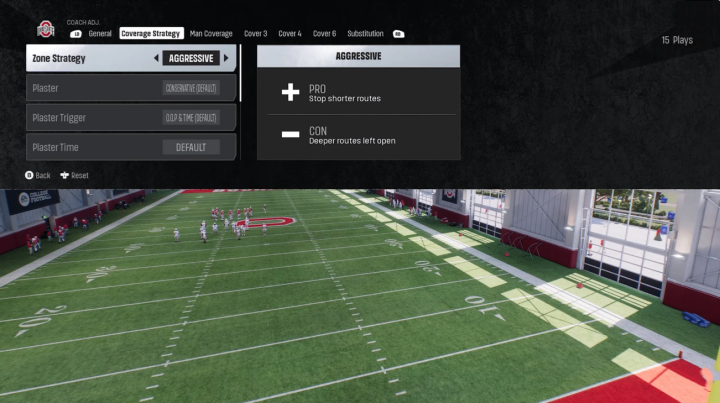
9. Learn to Adjust Zone Strategy
Zone Strategy is one of the most powerful defensive adjustments in the game.
Available options include:
Aggressive
Conservative
Ultra Aggressive
Ultra Conservative
Each changes how defenders prioritize routes.
Aggressive
Better against:
Comebacks
Outs
Curl routes
However, defenders become more vulnerable to:
Posts
Deep shots
Double moves
Conservative
Defenders stay deeper, protecting against:
Deep posts
Vertical concepts
Explosive plays
The tradeoff is allowing easier completions underneath.
Choosing the correct setting depends entirely on how your opponent attacks your defense.
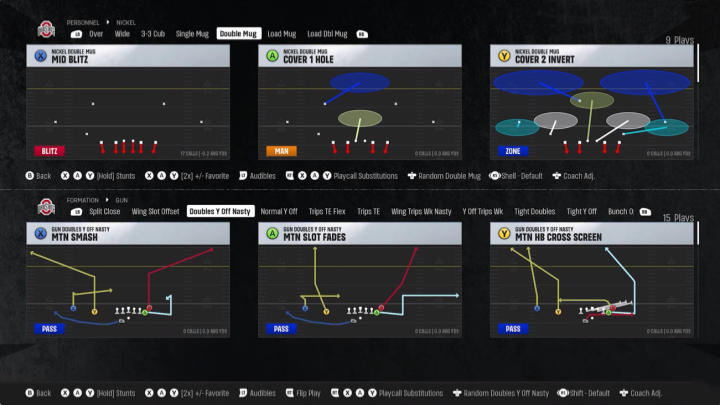
10. Explore the New Coverage Checks
College Football 27 introduces a completely new layer of defensive customization through Coverage Checks.
These allow specific adjustments based on offensive formations.
Examples include:
Man Coverage
Combo checks
Point Combo
Stack adjustments
These improve coverage against bunch and stacked formations.
Cover 3
Players can choose between:
Traditional drop zones
Match coverage concepts
Cover 4 and Cover 6
Additional checks help defend trips formations more effectively.
Although mastering these options requires practice, they provide experienced players with significantly greater defensive flexibility than previous games.
Final Thoughts
The coaching adjustment menu in College Football 27 is one of the most overlooked tools available, yet it can dramatically improve your gameplay once you understand how each setting works.
Instead of relying on default AI behavior, take control by customizing pass protection, improving blitz recognition, adjusting defensive alignments, and tailoring your coverage to your opponent's tendencies. Small changes like enabling Untarget User Defender, setting Auto Pass Protection to Empty cheap College Football 27 Coins, or adjusting Zone Strategy at the right moment can make the difference between forcing a turnover and giving up a game-winning touchdown.
As future updates and patches continue to balance gameplay, some recommendations—particularly Aggressive Blocking—may change. However, learning the purpose behind each coaching adjustment will remain valuable throughout the game's lifecycle. Players who actively adapt their settings instead of leaving everything at default will consistently have an edge in both online competition and dynasty mode.