Weekend Drop -













Summary: The football gaming community has been set ablaze as EA Sports FC 26 receives a massive, unexpected next-gen visual upgrade on PC. Tech-savvy modders have successfully extracted an unreleased, leaked NVIDIA DLSS 5 DLL file from early database builds and injected it directly into the FC 26 PC installation folder.
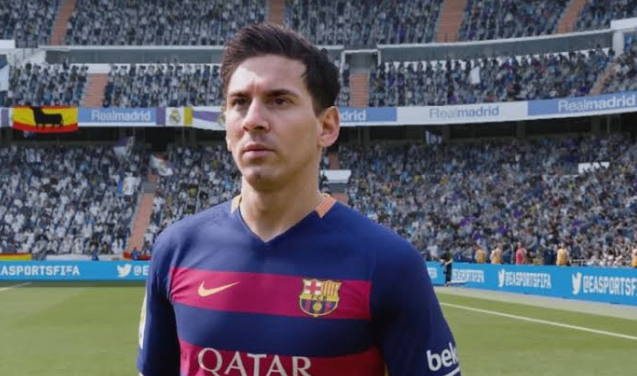
When paired with advanced, custom LUT color correction profiles via ReShade, the results have left casual players and esports pros alike completely stunned. Social media platforms are flooded with side-by-side comparisons, with many proclaiming that this community-driven breakthrough delivers the most photorealistic football simulation ever witnessed in video game history.
If you are wondering whether FC 26 running with DLSS 5 + Color Correction actually changes the game significantly, or if it is just overhyped marketing jargon, the definitive answer is: Yes, it completely rewrites the visual rulebook for the Frostbite Engine.
The Tech Breakdown: Why DLSS 5 Matters for EA Sports FC
For over half a decade, PC players have voiced major frustrations regarding how EA Sports titles look out of the box. Despite iterations to the Frostbite Engine and the inclusion of HyperMotionV technology, FC 26 often suffers from a distinctly "washed out" color palette. Player skin tones frequently look plastic or oily, stadium floodlights lack realistic volumetric dispersion, and the pitch itself often resembles a neon-green arcade rug rather than professional turf.
Traditionally, the PC modding community relied on heavy post-processing shaders to mask these flaws. However, stacking filters usually resulted in massive frame rate drops, blurry text, and jagged artifacts.
The introduction of the leaked NVIDIA DLSS 5 (Neural Reconstruction & 3D-Directed Spatial Rendering) changes the paradigm entirely. Unlike DLSS 3 or 4, which primarily relied on 2D motion vectors and frame generation to upscale static images, DLSS 5 leverages an AI-trained neural model that understands 3D depth, geometric occlusion, and sub-pixel lighting changes.
When you combine this intelligent upscaling with professional-grade color LUTs (Look-Up Tables) designed to mirror real-world broadcasting feeds, the visual improvements break down into three major, game-changing categories:
1. True Broadcast-Quality Pitch and Volumetric Lighting
The standard neon hue of the turf is entirely replaced. The custom color correction brings out deep, natural, organic grass variations that perfectly match a real-life Premier League or Champions League television feed. Furthermore, DLSS 5 corrects how light scatters across individual blades of grass. Stadium shadows are no longer harsh, pixelated blocks; they softly diffuse across the pitch based on the position of the virtual sun or stadium floodlights.
2. Absolute Elimination of Fast-Motion Ghosting and Blur
One of the notorious flaws of using traditional upscalers (like DLSS 3, AMD FSR, or Intel XeSS) in sports games is "ghosting." Because a football moves at incredibly high speeds across contrasting green backgrounds, a faint trail or blur often follows the ball or the flying limbs of sprinting players. DLSS 5's neural upscaling predicts pixel trajectories with surgical precision. It entirely eliminates trailing artifacts, maintaining razor-sharp clarity even when playing at blistering speeds of 120 FPS or 144 FPS in 4K resolution.
3. Hyper-Realistic Player Models and Kinematics
Close-up engine cutscenes-such as goal celebrations, yellow card arguments, and pre-match walkouts-benefit the most. The artificial sharpness that gives video game characters their "uncanny valley" look is replaced by a cinematic, natural softness. Sweat droplets reflect the stadium lights accurately, jersey fabric folds naturally without clipping, and facial micro-expressions look undeniably lifelike.
As captured perfectly by prominent community channels tracking the mod, "FC 26 with DLSS 5 is one of the most impressive things I've ever seen in my life when it comes to gaming."

Hardware Shock: Running DLSS 5 on RTX 40 and RTX 30 Series GPUs
When rumors of DLSS 5 first surfaced, the general consensus was that NVIDIA would lock the technology exclusively behind their highly anticipated, next-generation RTX 50-series graphics cards. However, underground PC testing has completely shattered that assumption.
Remarkably, the leaked DLSS 5 .dll file works flawlessly on RTX 40-series (Ada Lovelace) and even older RTX 30-series (Ampere) GPUs.
By dropping the modified nvngx_dlss.dll into the game's core directory and utilizing a specialized configuration via the FC Live Editor, players are seeing unprecedented performance gains. Benchmark data floating around tech forums indicates that frame rates have surged by 35% to 50% compared to native 4K rendering. This means a mid-range card like the RTX 4070 or RTX 3080 can comfortably run the game at Max Settings, Ray Tracing enabled, with a locked 4K/144Hz output-all while delivering a vastly superior image to anything seen on current-gen consoles.
For players looking to further develop their Ultimate Team squads while exploring the latest FC 26 Coins options, it is important to keep the graphical mod completely separate from any online gameplay activity.
Step-by-Step: How Players Are Activating the Mod
(Disclaimer: Proceed at your own risk. Modifying game files can conflict with anti-cheat software.)
For those eager to experience this graphical leap, the community has established a relatively straightforward installation pipeline on PC:
Locate the File: Players are sourcing the leaked nvngx_dlss.dll v5.0.0 file from verified tech repositories or GitHub mirrors.
Directory Injection: Navigate to your EA Sports FC 26 root installation folder (usually found under Program Files\EA Games\EA SPORTS FC 26). Back up your original DLSS file, then overwrite it with the new v5.0.0 file.
Install ReShade: Download the latest version of ReShade. Target the FC26.exe file during setup and select the DirectX 12 rendering API.
Apply the Color Preset: Download a community-verified "Realism Broadcast LUT" or "EPL Color Correction Preset" and drop the .ini file into the main folder.
Launch via Live Editor: Open the game using the FC Live Editor tool to ensure the game engine hooks the customized graphic parameters correctly upon boot-up.
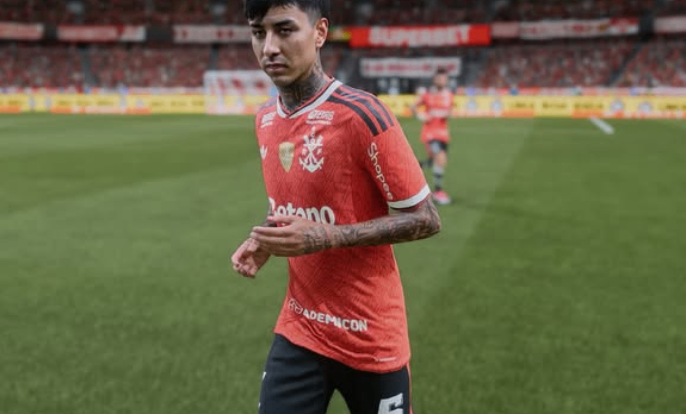
Ultimate Team Alert: Is It Safe from EA Anti-Cheat?
Before you rush to overhaul your graphics, a massive word of warning regarding EA Anti-Cheat (EAAC).
While utilizing basic ReShade configurations for standalone color correction is generally ignored by EA in offline environments (like Career Mode, Manager Mode, or Kick-Off), swapping out core engine files like the DLSS DLL is a massive red flag. Executing this mod while connected to the EA Servers can trigger a permanent hardware ban in FC 26 Ultimate Team (UT) or Clubs.
If you want to experience this jaw-dropping graphical masterpiece without risking your club or your digital purchases, it is highly mandatory to play completely offline or disconnect your PC from the internet while the modded files are active. Players considering buy EA FC 26 Coins should likewise keep any account-related activity separate from modified game files and offline mod testing.