Weekend Drop -













Summary
The NBA 2K27 MyPLAYER Builder introduces several important changes that can dramatically affect how you create and optimize a build. While the interface may look familiar, attribute penalties, badge requirements, animation thresholds, badge tokens, and synergy systems have all changed.
If you want to build a competitive MyPLAYER without wasting attribute points, you need to understand how these systems interact before finalizing your build. To test different setups, buy NBA 2K27 MT and fund multiple builds without the grind.
Start With Your MyPLAYER Basics
Choose Your Player Type
NBA 2K27 lets you choose between a male or female MyPLAYER.
Female players are restricted to City gameplay, while male players can access additional experiences such as MyCAREER and Eras. After selecting your player type, you can either use a template build or create a custom build.
For maximum control, the custom builder is the better option because you can optimize your physicals, attributes, badges, animations, and eventual Cap Breakers around your preferred playstyle.
Set Your Physicals Carefully
Height, weight, and wingspan have a much larger impact on attributes in NBA 2K27 than they did previously.
For example, a smaller guard or wing going with minimum weight and minimum wingspan can now take a significant hit to perimeter defense and driving dunk. You should therefore avoid automatically choosing the lightest weight or shortest wingspan simply to maximize speed.
Interestingly, the relationship changes around 6'10" and above. At these taller heights, reducing weight can actually improve perimeter defense. This creates a meaningful distinction between smaller perimeter players and bigger builds.
The key lesson is simple: never assume that last year's physical settings will work in NBA 2K27.
Understand the Attribute and Badge System
Once your physical profile is locked in, you can begin allocating attributes.
Use the Relevant Badges View
The Builder lets you switch between relevant badges and all badges while adjusting attributes. This is especially useful because several badge categories have been separated.
For example, offensive and defensive rebounding badges are now separated, while certain mid-range and three-point shooting badges have their own requirements.
Watching the badge thresholds while increasing attributes helps you identify the most efficient rating points.
A single attribute upgrade can sometimes unlock an additional badge token, making that extra rating point considerably more valuable than it initially appears.
Badge Tokens Are Determined by Attributes
Your attribute distribution determines how many badge tokens you receive in each discipline.
Higher shooting attributes can provide more shooting badge tokens, while increasing defensive or rebounding attributes affects the corresponding categories.
This means you should consider two things simultaneously:
1. The attribute rating you need.
2. The badge tokens that rating generates.
Don't build entirely around reaching individual attribute thresholds. A build that technically reaches an important badge requirement but lacks enough tokens to equip it may not perform as expected.
Check Badge Requirements Before Finalizing
The Builder includes a dedicated badge information screen showing badge requirements, levels, height restrictions, and other relevant information.
Hall of Fame Is the Attribute Ceiling
Through normal attribute investment, Hall of Fame is the highest badge level you can directly unlock.
Legend-level badges require the new synergy system rather than simply pushing an attribute higher.
This makes badge planning much more important because reaching a high attribute rating isn't necessarily the end of your badge progression.
Check Animations Before Spending Attributes
The animation tab is one of the most important tools in the NBA 2K27 Builder.
It shows the attribute requirements for different jump shots, dribble moves, signature animations, and other gameplay animations.
Animation Requirements Have Changed
Don't assume an animation has the same requirement as it did in NBA 2K26.
For example, the Kevin Durant Go-To Shot requires a 94 shooting rating in the described NBA 2K27 Builder, while the SGA Escape requires 91 Ball Handle.
That means an 85 Ball Handle build that worked for your favorite moves previously may no longer unlock everything you want.
Before finalizing your build, identify your must-have animations and work backward from their requirements.
Cap Breakers Require Extra Planning
Cap Breakers are another major part of the new Builder.
However, there is an important limitation: you cannot view your Cap Breaker amounts in the Builder until the build reaches 99 Overall.
Once you reach 99, the Cap Breaker tab becomes available.
Cap Breakers Do Not Give Extra Badge Tokens
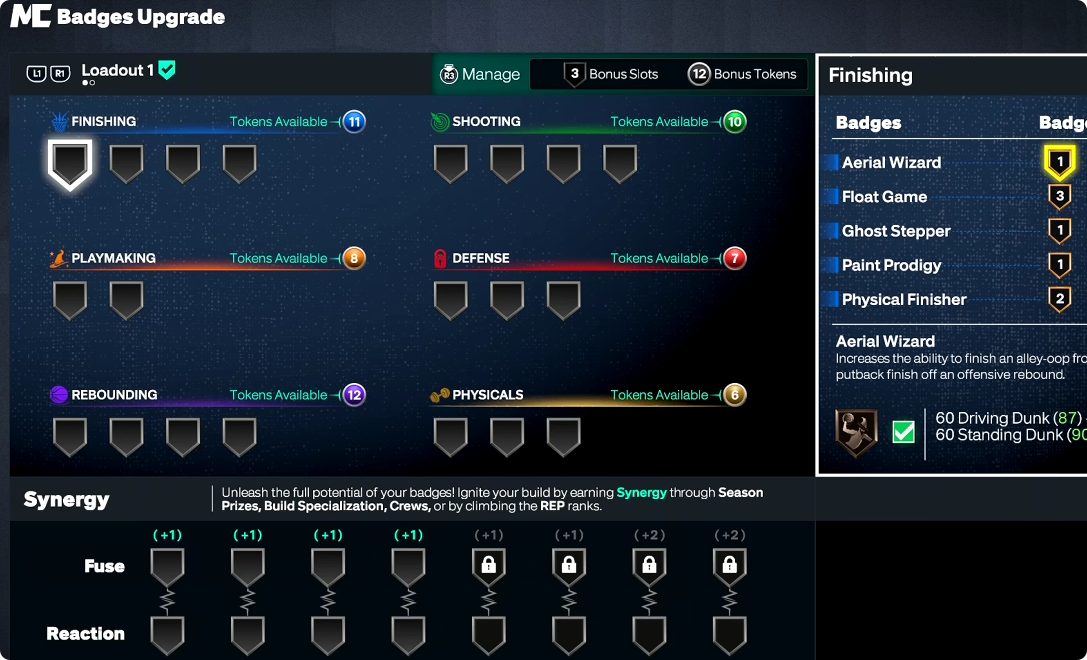
One of the most important things to understand is that applying Cap Breakers does not generate additional badge tokens.
Your badge-token allocation is determined by the attributes you initially build.
For example, if you create a build with a low three-point rating and intend to use Cap Breakers to raise it dramatically later, you still need enough shooting badge tokens to take advantage of the resulting badge thresholds.
This makes your initial attribute distribution extremely important.
How Badge Tokens and Bonus Slots Work
NBA 2K27 changes how badges are equipped.
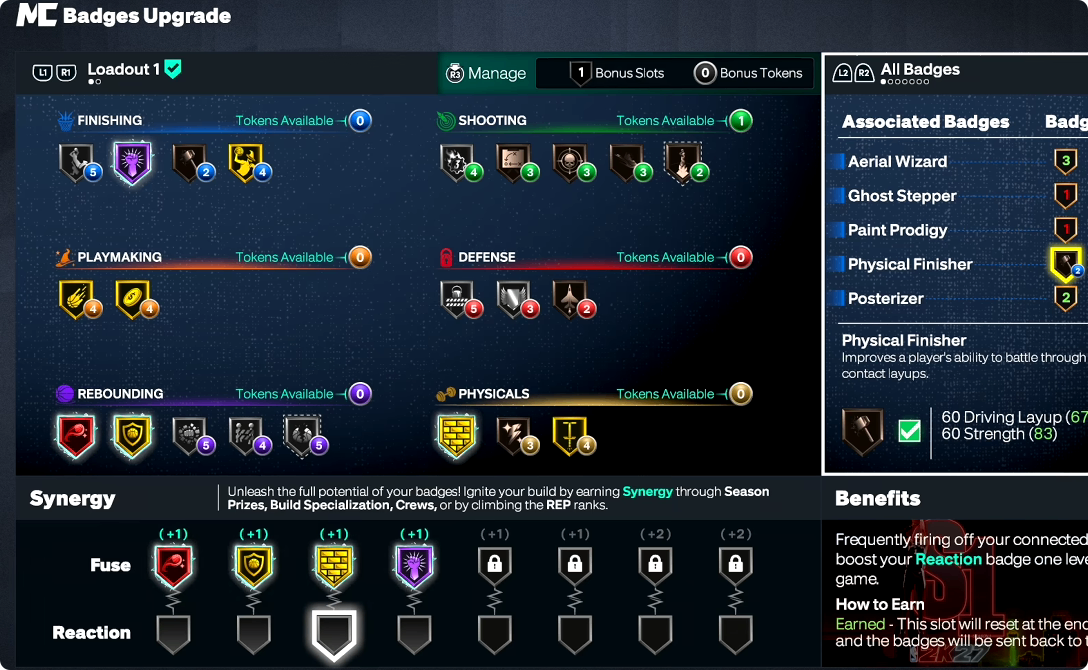
Instead of automatically receiving every badge your attributes qualify for, you have a limited number of tokens and must decide which badges deserve those resources.
Bonus Tokens
Bonus tokens can be earned through progression and moved between disciplines.
If you are one token short of unlocking a badge you really want, you can allocate a bonus token to that category.
This gives you additional flexibility when optimizing a specialized build.
Bonus Badge Slots
Bonus slots solve a different problem.
You may have enough tokens but not enough available slots to equip every badge you want. A bonus slot can increase the number of badges you can equip within a discipline.
For example, if a category contains five useful badges but your build only has four slots, a bonus slot can unlock the fifth position.
Master the Fuse and Reaction Badge System
The most complicated part of the NBA 2K27 Builder is the synergy system.
Fuse Badges Can Reach Legend
Fuse badge slots can provide a +1 or +2 badge-level boost without requiring additional badge tokens.
Most importantly, this is where you can push a badge beyond Hall of Fame and into Legend.
When you place a badge into a Fuse slot, the tokens used for that badge can also be refunded. This creates another layer of optimization because those recovered tokens can potentially be redirected to other disciplines.
As you unlock more Fuse slots through progression, the system becomes increasingly powerful.
Reaction Badges Require Activation
Reaction badges work differently.
A Reaction badge is connected to the Fuse badge above it. You must trigger the Fuse badge enough times during a game before the linked Reaction badge receives its temporary boost.
For example, a center might use Brick Wall as the Fuse badge and connect a shooting-related Reaction badge to it. After setting enough screens, the Reaction badge can activate for the remainder of that game.
The most effective strategy is therefore to select Fuse badges you expect to activate frequently.
Not Every Badge Combination Works
Fuse and Reaction badges have specific relationships.
A Reaction badge may appear for one Fuse badge but disappear when you select another. This means you cannot freely connect every badge to every Fuse option.
Before finalizing your synergy setup, test the available combinations and choose pairings that naturally match your playstyle.
Build Strategy for NBA 2K27
The biggest mistake you can make is building around one impressive attribute while ignoring the rest of the system.
Instead, follow this order:
1. Choose your position, height, weight, and wingspan.
2. Identify the animations you absolutely want.
3. Check badge thresholds for your desired playstyle.
4. Allocate attributes while watching badge-token changes.
5. Check whether your physical choices create unnecessary penalties.
6. Plan your future Cap Breakers.
7. Decide where bonus tokens and bonus slots will eventually go.
8. Choose Fuse and Reaction badges that complement your actual gameplay.
The NBA 2K27 MyPLAYER Builder rewards players who plan the entire build instead of simply chasing the highest possible ratings.
Final Thoughts
The NBA 2K27 Builder may look similar to previous versions, but its underlying optimization is considerably more complicated. Physical thresholds, attribute penalties, animation requirements, badge tokens, bonus slots, Fuse badges, Reaction badges, and Cap Breakers all need to work together.
The most important takeaway is to check everything before you finalize your build. A few points of weight, wingspan, or attributes can change your defensive ratings, dunk potential, badge tokens, and animation access.
If you plan around your desired animations and badge thresholds first, then optimize attributes and future Cap Breakers around them, you can create a much more efficient MyPLAYER instead of discovering expensive mistakes after you've already invested hours into the build. To refine your build without the time sink, NBA 2K27 MT can help you experiment with different setups and reach your ideal attribute thresholds faster.