Summary
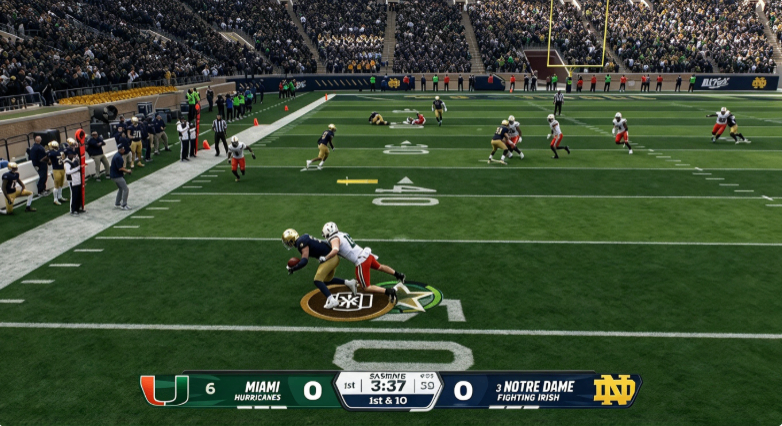
If your College Football 27 settings are still the ones you used in week one, you are giving away free wins. Months of patches have shifted the meta: the best passing control has flipped, timing-based catching has been rebalanced, and several coaching adjustments that used to be traps are now mandatory. The good news is the new setup is simple once you know what moved. Here is the current best-in-practice settings menu, broken down by what every player should run and what only the top one percent should touch, with College Football 27 Coins available as an additional resource for players working on their team progression.
Passing: Revamped Is Now the Default
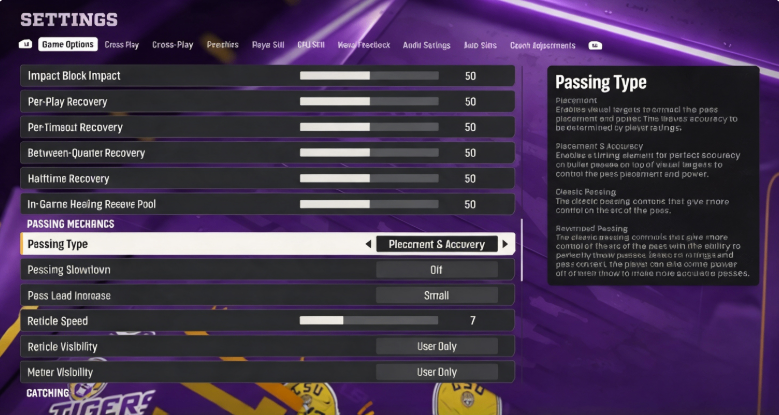
The biggest change is passing. For most of the year, Placement and Accuracy was the community default. That has flipped. Revamped passing now has the better ball trajectories, lets you lead receivers cleanly with just the left stick, and drops the ball into tight windows without extra button presses. If you are not a top one percent player, there is no reason to leave Revamped.
On Revamped, set pass lead increase to small and reticle speed around fifteen. That combination gives you most of the lead control you need without overshooting. Placement and Accuracy still has a small edge for players who fully master freeform throwing with L2, but on that control scheme you want reticle speed closer to seven. Most players reading this will never reach that level, so Revamped with a fifteen reticle speed is the highest-upside choice.
Catching and Gameplay Helpers
Timing-based catching was overpowered early in the year and has since been tightened. It is still worth leaving on, but the consensus sweet spot is now five yards rather than ten. Anything shorter than five yards, like screens, flat routes, and checkdowns to the running back, should not require a timed catch. Five yards and beyond, digs, posts, and streaks, the timing window helps. Set the same five-yard threshold on both offense and defense.
Turn defensive ball hawk on permanently. It unlocks the best interception animations and helps even AI defenders play the ball in the air.
The assists are where your skill level matters. If you are not a top one to two percent player, leave defensive heat seeker on with the window at two hundred percent. It steers open-field tackles toward the ball carrier, which most players badly need. If you are genuinely good in space, turn it off: the assist briefly overrides your angle, and elite players can exploit that half-second of assistance to juke you. Defensive switch assist works the same way, on for normal players, off for the top tier. Just know that setting has a long-standing bug where it silently turns itself off, so check it every few games.
Two more helpers are no-brainers for everyone. Set switch stick delay to Slight so you do not accidentally switch onto the wrong defender right as the ball is snapped. And turn the controlled-player visual on. It draws your zone and your run-fit gap on the field, which is the single best teaching overlay in the game for knowing where you are actually supposed to be.
Coin Toss, Camera, and Accessibility Tweaks
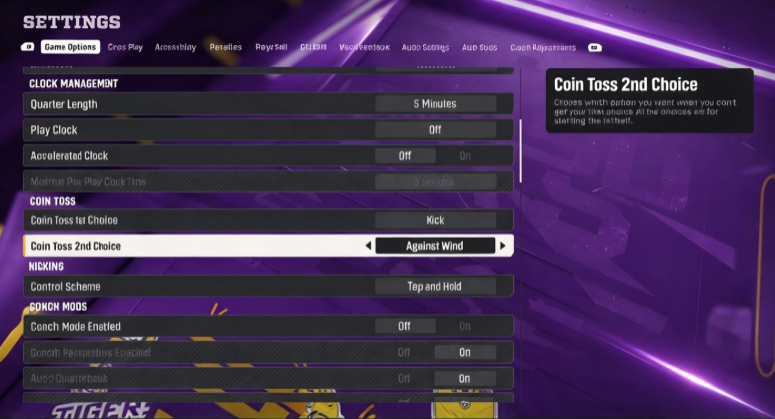
Set your coin toss first choice to Kick. That means you receive to start the second half, which lets you dictate the back half of the game: chew clock with a lead or force a quick drive from behind. Set the second choice to Against Wind, so the wind is at your back in the second and fourth quarters. That can add a few yards to a game-winning field goal, and in a close online matchup those yards win games.
Under visual feedback, turn camera toggle off. Most players run a single camera all game, and an accidental D-pad press right before the snap used to scramble your view mid-play. Lock your camera in place. If timing catches or passing feels off, try turning on enlarged on-field graphics in the accessibility menu: bigger receiver icons and a bigger timing meter help some players noticeably.
Coaching Adjustments That Actually Win Games
Start on offense. Set blocking to Balance. Aggressive used to give free blocking with no penalties, then it was patched to cause a flood of flags, and now the community treats it as a placebo. Auto base protection should be Base, which strips out the hidden half-slides that leave your edge unblocked when you hot route your running back out. Turn untarget user defender on: a recent patch fixed the old problem where it ignored the user defender on run plays, so now it simply tells your line to stop reacting to someone mugging the A gap in a cover-zero blitz. Set wide receiver scramble support to Aggressive, and leave zone window awareness off; predictable routes are worth more than smart random stops in a video game.
On defense, auto flip play call on so your strength matches up automatically. Set cornerback matchups to Balance, never Speed or Overall, because those modes glitch and leave a corner lined up across the field from his receiver. Community testing now has defender aggression and gap integrity both on Aggressive; the feared fatigue penalty has not shown up in practice. Pin safety width and set safety depth to nine: that keeps you from getting beaten over the top while still supporting the run.
Option and RPO keys are the highest-leverage defensive adjustments. Set option read key to Conservative so the quarterback gets hit in the backfield when he keeps it. Set pitch key to Conservative if you are comfortable user-defending the running back yourself, or Aggressive if you are not. Set RPO read and pass key to Conservative to slow the bubble screens and flats that RPO spam loves. On plaster, stop running all-aggressive; the better setup now is Conservative, trigger on Time, and plaster time alone on Aggressive. That matches receivers without latching so hard that scramble QBs break the pocket for easy yards.
Final Verdict
The College Football 27 settings meta is more forgiving than it was at launch. Revamped passing, five-yard timing catches, controlled-player overlays, and the conservative option and RPO keys remove most of the free-wind nonsense that used to decide close games. Run the defaults listed here unless you are a top-two-percent player, and only turn off the assists once you can consistently make open-field tackles on your own. Set them once in the main menu, then tweak the defensive adjustments in-game based on what your opponent is actually running. Players looking to keep their team progression moving while fine-tuning their setup can also buy College Football 27 Coins for additional resources.