Path of Building 2 (PoB 2) is an essential third-party build planner for Path of Exile 2 that allows players to theorycraft, optimize, and share character builds offline. It calculates skill DPS, damage over time, life/mana/energy shield totals, and can factor in auras, buffs, charges, curses, and monster resistances. The tool also integrates with Path of Exile 2's in-game Build Planner feature introduced in Patch 0.5 "Return of the Ancients," which lets players import community-made builds directly into the game client. This guide covers everything you need to know to start using PoB 2 effectively.
Summary
Path of Building 2 (PoB 2) is an essential third-party build planner for Path of Exile 2 that allows players to theorycraft, optimize, and share character builds offline. It calculates skill DPS, damage over time, life/mana/energy shield totals, and can factor in auras, buffs, charges, curses, and monster resistances. The tool also integrates with Path of Exile 2's in-game Build Planner feature introduced in Patch 0.5 "Return of the Ancients," which lets players import community-made builds directly into the game client. This guide covers everything you need to know to start using PoB 2 effectively. To test your builds in-game, buy POE2 Currency and gear up without the grind.
Downloading and Installing Path of Building 2
Where to Download
Path of Building 2 is a community-driven project available on GitHub. It is a standalone tool separate from the Path of Exile 1 version. You can download the latest release from the official GitHub repository.
When you visit the Releases page, look for the "Assets" section under the latest release. You will find two main options: the Setup.exe file, which is recommended for most users and runs a standard installation wizard, and the portable .zip file for users who prefer a version that does not require installation.
After downloading, run the installer and install the program in your preferred drive. Since it is a standalone application, it does not need to be inside the Path of Exile 2 folder.
Version Note
Make sure you download the PoE 2 version, not the PoE 1 version. The Path of Building Community fork maintains both games separately.
Understanding PoB 2's Interface
Main Tabs Overview
PoB 2 is organized into several key tabs, each serving a specific function.
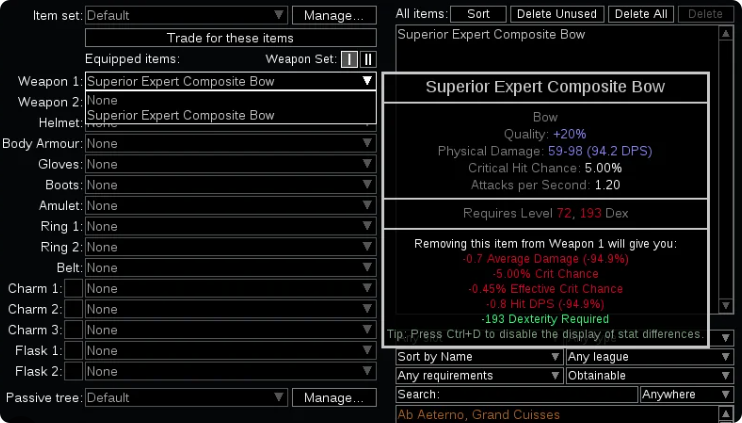
The Import/Export tab is used to load builds from share codes or URLs and export your own builds. The Items tab handles gear slots, crafting simulation, and item comparison. The Skills tab manages gem and support gem configuration. The Tree tab is where you plan your passive skill tree with node power rankings. The Calcs tab provides DPS and EHP breakdowns with hover tooltips showing data sources. The Config tab allows you to set quest rewards, enemy settings, and combat assumptions.
What the Colors Mean
Throughout the program, supported modifiers will show in blue, while unsupported ones show in red. This makes it easy to identify which parts of your build are fully calculated by the tool.
How to Import Builds into PoB 2
Method 1: Import from Pobb.in Links
Most content creators host their builds on pobb.in. To import one, open the build guide and look for the PoB section with a pobb.in link. Copy the URL at the top of the page, then open Path of Building 2 and click the Import/Export button at the top left. Paste the URL into the "To import a build, enter URL or code here" field and click Import.
The entire build—including passive tree, skills, support gems, and gear—will load instantly.
Method 2: Import from PoEPlanner or PathofExile.com Links
The passive tree planner can import links from PoEPlanner.com and PathofExile.com passive tree URLs.
Method 3: In-Game Build Planner Integration
Patch 0.5 introduced a new in-game Build Planner that works alongside PoB 2.
To import a build into the game client, first download the .build file from a build hosting site such as Mobalytics. Navigate to the BuildPlanner folder located in your Documents under My Games, then Path of Exile 2. Copy and paste the downloaded .build file into this folder. Open Path of Exile 2 and open your Passive Skill Tree by pressing P, then click the Build Planner icon in the top-left corner. Select the imported build from the dropdown menu.
Once imported, the game will highlight passive nodes in blue, showing the exact path to follow. Hover the Build Planner icon on gear slots to see recommended items. The interface also shows which Skill, Spirit, and Support Gems the build requires.
Many builds come with multiple files for Leveling, Midgame, Lategame, and Endgame. You can switch between them as you progress.
Configuring Skills and Support Gems
Adding Skills
In the Skills tab, click New Group to create a skill group, then search for your main skill by name, such as Earthquake or Spark. The skill will be added to your build.

Adding Support Gems
Select your active skill in the Skills tab, then click the support gem slots below it. Search for the support gems your build requires. The tool auto-suggests DPS boosters based on your skill tags.
PoB 2 supports all skills and support gems currently in the game. It also automatically applies socketed gem modifiers from the item a skill is socketed into.

Calculating DPS and Character Stats
Config Tab – Setting Up Combat Assumptions
Before you can get accurate DPS numbers, you need to configure the Config tab. Set Enemy Type to Guardian or Shaper for realistic endgame DPS estimates. Configure which quest rewards your character has. Turn auras, curses, and buffs on or off that your build will use. Set power, frenzy, and endurance charges if your build generates them.
The tool can factor in auras, buffs, charges, curses, monster resistances, and more to estimate your effective DPS.
Calcs Tab – Reading the Damage Breakdown
The Calcs tab provides a detailed breakdown of how your DPS is calculated. You can hover over any stat to see where the value comes from. Damage types such as Physical, Lightning, Cold, Fire, and Chaos are calculated separately.
PoB uses the formula: Final Damage = Base Damage × (1 + ΣINC) × Π(1 + MORE). Blue text indicates fully supported calculation, while red text means the calculation is not yet implemented.
Other Stats Calculated
PoB 2 also calculates life, mana, and energy shield totals, life and mana reservations, minion stats with full support for minion builds, effective HP and max hit stats for physical, elemental, and chaos damage, attack and cast speed, and critical strike chance and multiplier.
Advanced Features
Item Planning
The Items tab is one of PoB 2's most powerful features. You can copy and paste items directly from the trading website to see how they would affect your character. Search the database of all uniques currently in the game. Simulate crafting by adding modifiers to rare items and choosing prefix and suffix rolls. Compare gear to see exactly how much of an upgrade a given item is. View effective HP and max hit stats that the game itself does not show.
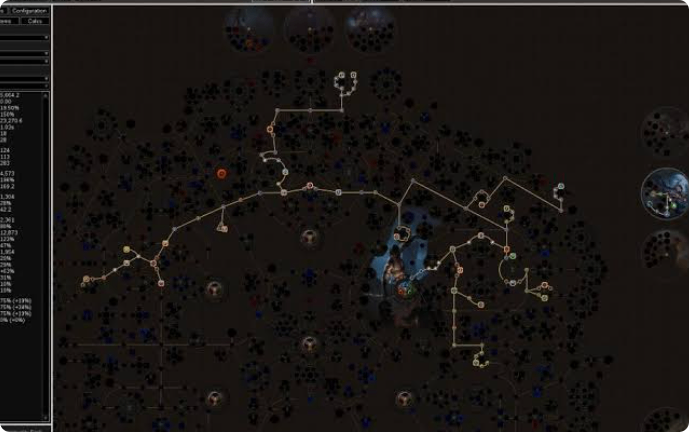
Passive Skill Tree Planner
The Tree tab helps you plan your passive path efficiently. You can trace alternate paths by mousing over a sequence of nodes while holding Shift, then clicking to allocate them all. The planner supports radius, conversion, and timeless jewels. You can see exactly how each node will affect your character's stats in real-time and plan multiple weapon sets with separate passive allocations.
For a melee physical tank build, prioritize armour and life nodes for sustain, path toward physical damage scaling clusters, and consider Keystones like Resolute Technique for guaranteed hits or Unwavering Stance to prevent stuns.
Build Sharing
To share your build, click Import/Export, select Generate, then click Share PB to get a share code or shortened link. This is how content creators share their builds with the community.
In-Game Build Planner vs. Path of Building
The in-game Build Planner introduced in Patch 0.5 is a more streamlined version that shows you what nodes and gems to take. Path of Building 2 goes much further—it shows you why they are optimal by calculating exact DPS, EHP, and stat interactions. Most serious players use both: the in-game planner for guided progression and PoB 2 for advanced theorycrafting and min-maxing.

Final Thoughts
Path of Building 2 is essential for anyone who wants to take Path of Exile 2 seriously. Whether you are following a content creator's build guide, theorycrafting your own character, or trying to decide if a trade item is worth the currency, PoB 2 provides the data you need. Supported modifiers appear in blue, making it easy to identify what the tool fully calculates, and the community continues to update the tool alongside the game's patches. With POE2 Currency, you can quickly acquire the gear PoB 2 confirms is best.